Activity plugin 1.1.0 / AdminCP
Badges
Admin
This page is for admins: the badges members get, on the Manage Activity Badges screen.
Badges#
Last updated: 2026-11-19 · v1.1.0
The list shows each badge's Badge name, Description, Activity Points (for example "100 pts within the last 90 days"), Icon, Notify and Status, with Edit and Delete. There is no badge after installing.
- Click Create new.
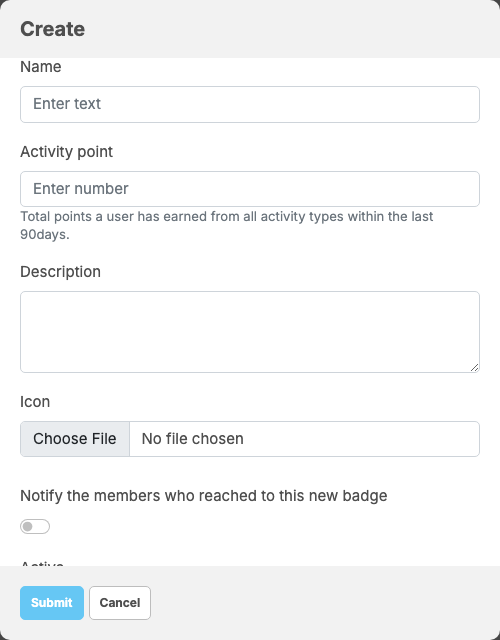
- Fill in Name (up to 255 characters), Activity point (the points needed: "Total points a user has earned from all activity types within the last 90days."), Description (required, up to 500 characters) and Icon (required for a new badge). Switch on Notify the members who reached to this new badge to send a notification, and leave Active on.
- Click Submit.
- Every night at 01:00, server time, each member gets the active badge with the highest points they reached in the last 90 days. Only points already paid count. A member who falls below every badge loses theirs.
- With Notify on, members are told when they unlock the badge, and when they lose it ("Your name badge is no longer active. Stay active to earn it again.").
- The badge's icon shows next to the member's name across the site.
Change log#
Last updated: 2026-11-19 · v1.1.0
| Date (GMT+7) | Section | What changed |
|---|---|---|
| 2026-11-19 | badges | New page. Its sections were moved here unchanged, with links to other pages updated: "Badges" (from the former page "Set up and use Activity"). |
| 2026-11-19 | badges | First version for Activity 1.1.0, written from the 1.1.0 code. The points, payouts and badges were read from the code, not run. Screenshots from a demo site running Activity 1.1.0 with no paid points yet. |
| 2026-11-19 | all | Pages reorganised: AdminCP content now has its own pages. |