Blog plugin 1.1.0 / AdminCP
Blog categories
Admin
This page is for admins: the blog categories.
Blog categories#
Last updated: 2026-11-19 · v1.1.0
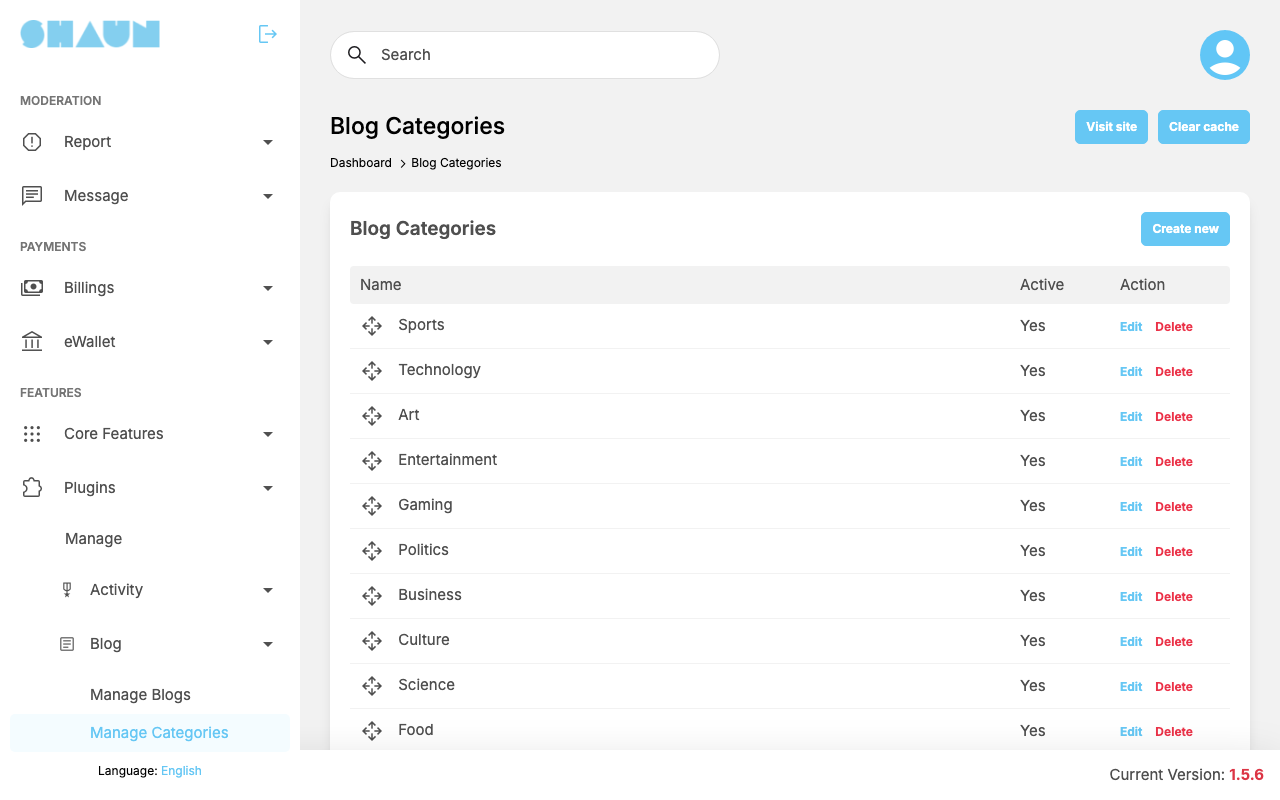
The screen Blog Categories lists the categories writers choose from, with Name and Active. Seventeen come with the plugin: Sports, Technology, Art, Entertainment, Gaming, Politics, Business, Culture, Science, Food, Animals, Education, Fashion & Beauty, Health & Fitness, News, Cryptocurrency and Travel. Drag the rows to change their order.
- Click Create new, or Edit on a category.
- Enter the Name (translations with Translate after creating), optionally choose a Parent to make it a sub-category, and leave Active on to offer it.
- Click Submit.
What you should see: "Blog category has been created." or "Blog category has been successfully updated."
Delete removes a category and its sub-categories ("Blog category has been deleted."). Writers can no longer choose it; blogs already in it are not deleted.
Change log#
Last updated: 2026-11-19 · v1.1.0
| Date (GMT+7) | Section | What changed |
|---|---|---|
| 2026-11-19 | categories | New page. Its sections were moved here unchanged, with links to other pages updated: "Blog categories" (from the former page "Set up Blog"). |
| 2026-11-19 | categories | First version for Blog 1.1.0, written from the 1.1.0 code. The actions and messages were read from the code, not run. |
| 2026-11-19 | screenshots | Screenshots from a demo site running Blog 1.2.0, the next version, whose screens shown here are the same as in 1.1.0. |
| 2026-11-19 | all | Pages reorganised: AdminCP content now has its own pages. |