Gift plugin 1.1.0 / AdminCP
Gift catalogue
Admin
This page is for admins: the gift catalogue, on the Manage Gifts screen.
Manage the gift catalogue#
Last updated: 2026-11-19 · v1.1.0
The list shows each gift's Name, Price, Icon and Status (active or not), with Edit and Delete. Type part of a name in Search to find a gift. Rows can be dragged by their four-arrow handle to change their order.
- Click Create new, or Edit on a gift.
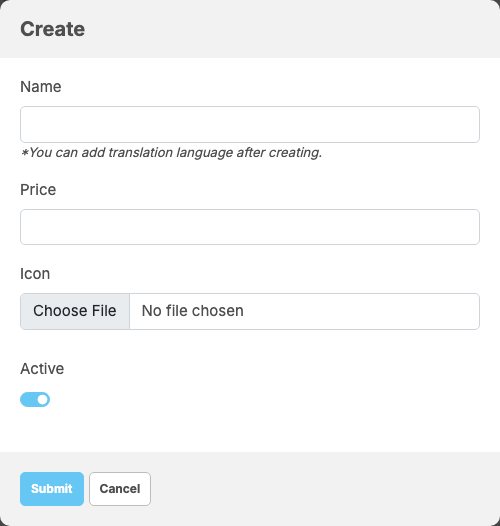
- Fill in the window:
Field What to enter Name the gift's name, up to 255 characters. Translations for other languages can be added with Translate after the gift is created Price what the gift costs the sender, in eWallet tokens: a whole number, at least 1 Icon the picture of the gift; required for a new gift. When editing, leave it empty to keep the current one Active off: the gift is no longer offered; a member who still has it on screen gets "This gift is no longer available." - Click Submit.
What you should see: "Gift has been created." or "Gift has been successfully updated."
A new price applies to gifts sent from then on; gifts already sent keep the price they were sent at. Delete asks for confirmation and removes the gift from the catalogue; in the lists of gifts already received it then shows as "Deleted Gift".
Change log#
Last updated: 2026-11-19 · v1.1.0
| Date (GMT+7) | Section | What changed |
|---|---|---|
| 2026-11-19 | manage-gifts | New page. Its sections were moved here unchanged, with links to other pages updated: "Manage the gift catalogue" (from the former page "Set up and use Gift"). |
| 2026-11-19 | manage-gifts | First version for Gift 1.1.0, written from the 1.1.0 code. No gift was sent while writing: the payments, the fee and the messages were read from the code, not run. Screenshots from a demo site running Gift 1.1.0 where the feature and the receiving permission were already switched on. |
| 2026-11-19 | all | Pages reorganised: AdminCP content now has its own pages. |