Livestream plugin 1.1.0 / AdminCP
Permissions
Admin
This page is for admins: the permissions that decide who may go live and what streaming costs.
Permissions#
Last updated: 2026-11-19 · v1.1.0
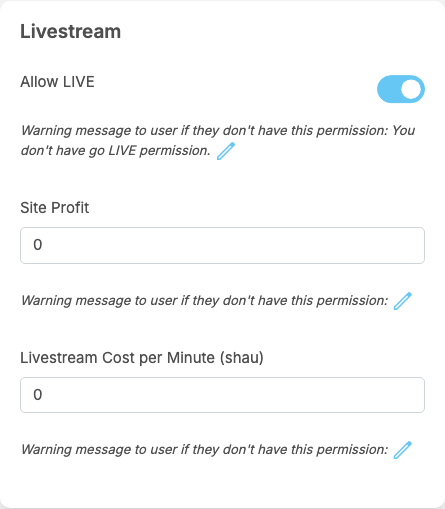
A member role's Permissions page has a box Livestream with three permissions. Watching and joining livestreams needs no permission: every member may watch, and guests may look at public livestreams.
| Permission | After installing (every member role) | What it does |
|---|---|---|
| Allow LIVE | on | going live and scheduling lives. Without it, Go Live answers with the role's warning message; after installing it reads "You don't have go LIVE permission." |
| Site Profit | 0 | the percentage of each join price the site keeps when a viewer pays to join a paid live of a member of this role, for example 20. The host gets the rest. 0: the host gets the whole price (see Paid lives) |
| Livestream Cost per Minute (your token name) | 0 | what a minute of streaming costs a host of this role, in eWallet tokens; decimals such as 0.5 are allowed. 0: streaming is free (see The streaming cost for the host) |
- The values that count are those of the host's role when the live starts: a change does not affect lives that are already running.
- Different roles can have different values, so a membership package that gives a role can include cheaper or free streaming, or a smaller site share.
- Only Allow LIVE has a warning message, under the switch; change it with the pencil icon. The other two fields show the same line, but no member ever sees it.
- Super admins and moderators may always go live. A super admin's role has no values for the other two permissions, so their streaming is free and the site keeps nothing from their paid lives.
The moderator permission#
On a moderator role's Permissions page, the box Manage Site has Manage Livestream, off for every moderator role after installing. It opens the three screens under AdminCP → Plugins → Livestream: the dashboard, the join prices and the provider details. Super admins always have them.
Change log#
Last updated: 2026-11-19 · v1.1.0
| Date (GMT+7) | Section | What changed |
|---|---|---|
| 2026-11-19 | permissions | New page. Its sections were moved here unchanged, with links to other pages updated: "Permissions" (from the former page "Set up and manage Livestream"). |
| 2026-11-19 | permissions | First version for Livestream 1.1.0, written from the 1.1.0 code. No live was started and no payment was made while writing: the provider check, the limits and the messages were read from the code, not run. Screenshots from a demo site running Livestream 1.1.0 with Agora already connected; the Agora fields were emptied in the picture. |
| 2026-11-19 | all | Pages reorganised: AdminCP content now has its own pages. |