Market Place Commerce plugin 1.1.0 / AdminCP
Orders
This page is for admins: the orders of all sellers, on the Orders screen.
Orders#
Last updated: 2026-11-19 · v1.1.0
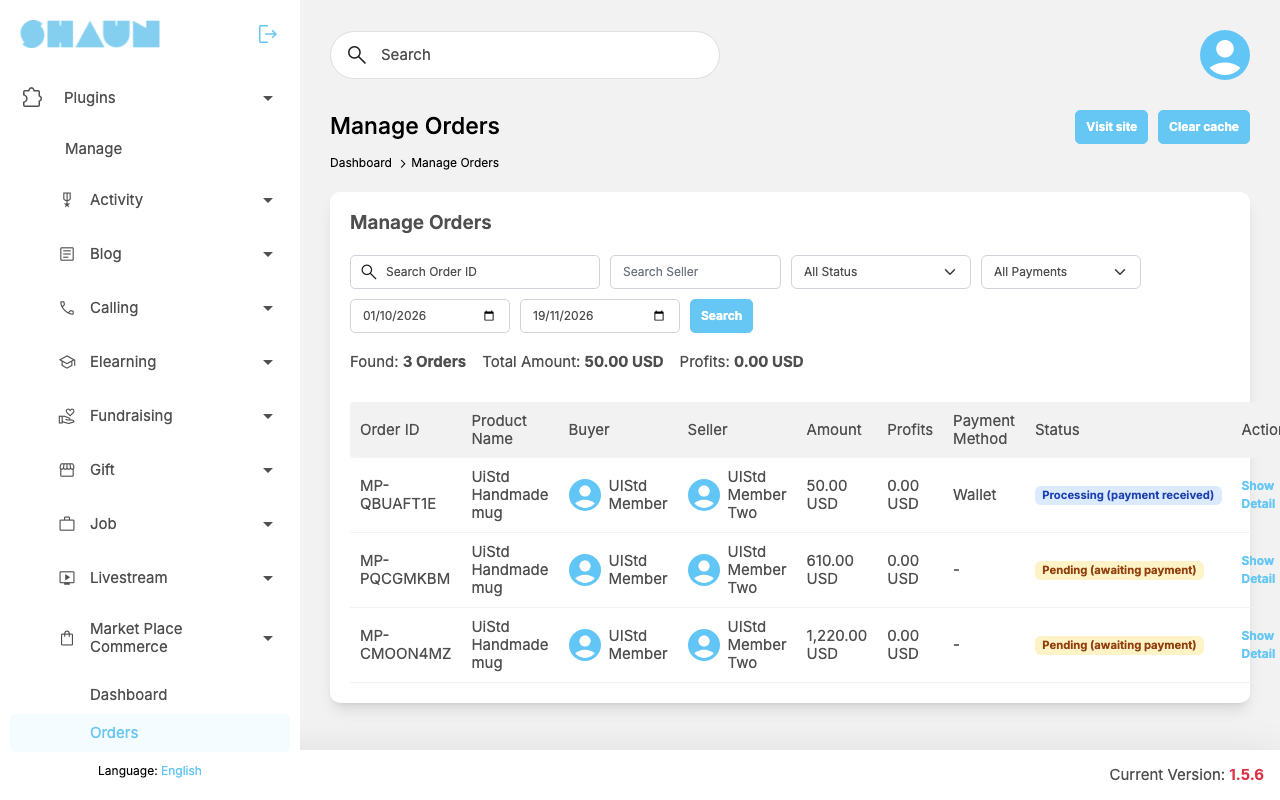
The screen Manage Orders opens on paid orders placed from the first day of the current month
to today. Change the filters and click Search: Search Order ID (order numbers look like
MP-7KQ2ZB1X), Search Seller, a status (All Status), All Payments / Paid
only / Unpaid only, and the two dates.
Above the list: Found (number of orders), Total Amount and Profits (the platform fees) of the matching orders, without pending and cancelled ones. With Unpaid only they become Total Pending Amount and Pending Profits, without cancelled orders. Amounts are in your site's currency.
The list shows Order ID, Product Name, Buyer, Seller, Amount, Profits, Payment Method (Wallet or the gateway's name) and Status. Show Detail opens Order Detail: the order information (amount, Platform Fee, created and Paid At dates), the buyer and seller, the product, the items and the Status History. This screen is for looking only: the order's status is changed by the seller.
Change log#
Last updated: 2026-11-19 · v1.1.0
| Date (GMT+7) | Section | What changed |
|---|---|---|
| 2026-11-19 | orders | New page. Its sections were moved here unchanged, with links to other pages updated: "Orders" (from the former page "Set up Market Place Commerce"). |
| 2026-11-19 | orders | First version for Market Place Commerce 1.1.0, written from the 1.1.0 code. No order was paid while writing: the payments, the fee and the messages were read from the code, not run. |
| 2026-11-19 | screenshots | Screenshots from a demo site running Market Place Commerce 1.1.0. The Buy Now window was opened but no order was placed; My Orders and the Seller Dashboard were not captured because the demo member has no orders or listings. |
| 2026-11-19 | all | Pages reorganised: AdminCP content now has its own pages. |