Check-in plugin 1.1.0 / AdminCP
Settings
This page is for admins: every setting of Check-in and the choice between Google Maps and OpenStreetMap.
The settings#
Last updated: 2026-11-19 · v1.1.0
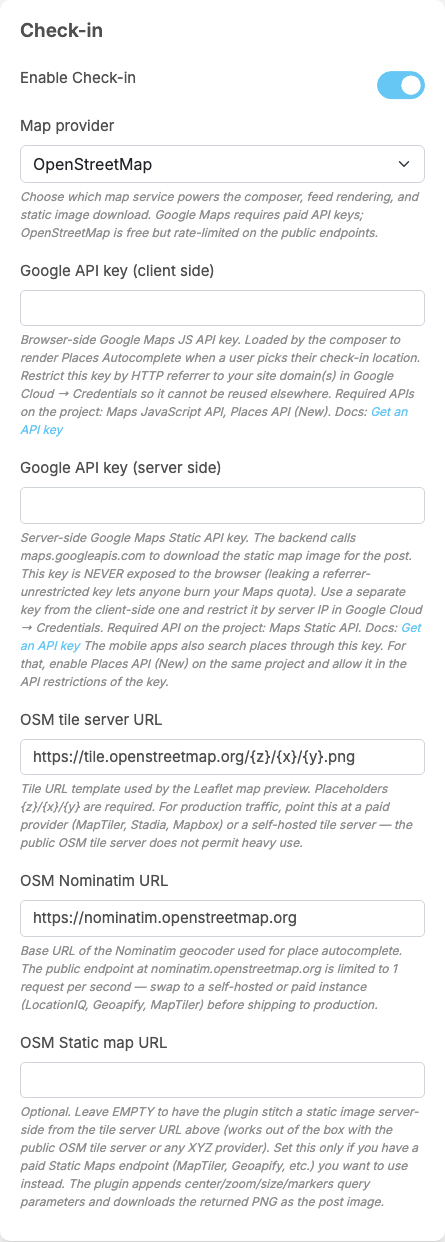
Check-in adds a part called Check-in at the end of General Configuration. Each setting saves itself as soon as you change it (see Settings save themselves). Members see a change the next time they load the site.
| Setting | After installing | What it does | When to change it |
|---|---|---|---|
| Enable Check-in | off | on: members see the Check in button | switch it on once the map provider is set up |
| Map provider | Google Maps | which service powers the place search, the map preview and the map picture: Google Maps or OpenStreetMap | choose OpenStreetMap if you do not want a Google account and keys. Posts made before keep their map picture |
| Google API key (client side) | empty | Google Maps only. The key the member's browser uses to search places in the composer. The help text asks to restrict it to your site's address in Google Cloud and to enable Maps JavaScript API and Places API (New) | fill it in when you use Google Maps |
| Google API key (server side) | empty | Google Maps only. The key your server uses to download the map picture of each post; it is never shown to browsers. Use a key other than the client-side one, restricted to your server's address, with Maps Static API enabled. "The mobile apps also search places through this key. For that, enable Places API (New) on the same project and allow it in the API restrictions of the key." | fill it in when you use Google Maps; also enable Places API (New) on it if members check in from the mobile apps |
| OSM tile server URL | https://tile.openstreetmap.org/{z}/{x}/{y}.png | OpenStreetMap only. Where the map pieces for the preview come from (and the map picture, when the next setting is empty). {z}/{x}/{y} must stay in the address | replace it with a paid or your own tile service before your site gets real traffic: the public server does not allow heavy use |
| OSM Nominatim URL | https://nominatim.openstreetmap.org | OpenStreetMap only. The place search service. The public one answers at most one request per second | replace it with a paid or self-hosted service for a live site |
| OSM Static map URL | empty | OpenStreetMap only. Optional: leave it empty and the server builds the map picture from the tile server above; fill in the address of a paid static map service to use that instead | only if you pay for a static map service |
These are all the settings of the plugin.
Google Maps or OpenStreetMap#
Last updated: 2026-11-19 · v1.1.0
| Google Maps | OpenStreetMap | |
|---|---|---|
| Cost | Google charges by use and requires an active Cloud billing account, even within its free allowance | free public servers for light use; a paid or self-hosted service for a busy site |
| What you set up | two API keys (client side and server side) with the APIs named above | nothing to start with; replace the public addresses for a live site |
| Map picture in the post | downloaded from Google by your server | built by your server from map pieces, or downloaded from your static map service |
| Clicking the map | opens the place on Google Maps | opens the place on openstreetmap.org |
Each map picture is 600 × 200 pixels and is stored on your site with the post, so it keeps showing if you change the provider later. A member can search places at most 60 times a minute.
Your server must be allowed to reach the map provider over the internet: Google's map servers for Google Maps, or the tile, Nominatim and static map addresses in the settings for OpenStreetMap. In Google Cloud, restrict the client-side key to the site's address (HTTP referrer) and the server-side key to the server's IP address.
Change log#
Last updated: 2026-11-19 · v1.1.0
| Date (GMT+7) | Section | What changed |
|---|---|---|
| 2026-11-19 | settings, providers | New page. Its sections were moved here unchanged, with links to other pages updated: "The settings", "Google Maps or OpenStreetMap" (from the former page "Set up and use Check-in"). |
| 2026-11-19 | settings, providers | First version for Check-in 1.1.0, written from the 1.1.0 code. Google Maps was not tried (the demo site has no Google keys); the steps were read from the code. Screenshots from a demo site running Check-in 1.1.0 with OpenStreetMap. |
| 2026-11-19 | all | Pages reorganised: AdminCP content now has its own pages. |