Friends plugin 1.0.0 / AdminCP
Settings
Admin
This page is for admins: the two settings and exactly what changes for members when Friends is on or off.
The settings#
Last updated: 2026-11-19 · v1.0.0
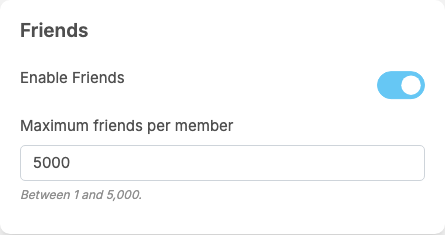
Friends adds a part called Friends at the end of General Configuration. Each setting saves itself as soon as you change it (see Settings save themselves). Members see a change the next time they load the site.
| Setting | After installing | What it does | When to change it |
|---|---|---|---|
| Enable Friends | on | switches the whole feature on or off (see the next section) | switch it off if your community should only follow, without losing the friendships made so far |
| Maximum friends per member | 5000 | "Between 1 and 5,000." A request cannot be sent or accepted when either member already has this many friends: "You have reached the maximum number of friends." or "This member has reached the maximum number of friends." | lower it to keep friendships personal; members above a new, lower limit keep their friends but cannot add more |
These are all the settings of the plugin. It has no settings for the mobile apps, which it does not support.
What changes when Friends is on or off#
Last updated: 2026-11-19 · v1.0.0
| Friends on | Friends off | |
|---|---|---|
| Following | works as before: members follow whom they like. Accepting a friend request also makes both members follow each other; unfriending removes the follows between the two, in both directions, also a follow that existed before the friendship | works as before; follows made by accepting requests stay |
| Profiles | a friend button (Add friend, Requested, Respond, Friends) and "n friends" next to posts, following and followers | no button and no count |
| Home page | a Friends tab next to Everyone | no Friends tab |
| Lists | a Friends list | no Friends list |
| Privacy choices | Friends is offered for profile details, who can comment on a post, who can send you a message and who can mention you; plus the setting Who can add me as friends | the Friends choices are not offered. Anything already set to Friends keeps that choice but acts like the strictest one: profile details are seen only by the member, messages and mentions come from no one, and only accounts mentioned in a post may comment on it |
| Friendships and requests | kept up to date | kept, but cannot be used: requests and unfriending answer "Friends feature is not available." |
- Blocking a member ends the friendship and deletes the requests between the two. A deleted account loses all its friendships and requests.
- Switching Friends back on also removes friendships and requests between members who blocked each other or deleted their account while it was off.
- Business pages take no part: they have no friend button, cannot send or accept requests, and do not get the Friends choice for messages and mentions.
Change log#
Last updated: 2026-11-19 · v1.0.0
| Date (GMT+7) | Section | What changed |
|---|---|---|
| 2026-11-19 | settings, on-off | New page. Its sections were moved here unchanged, with links to other pages updated: "The settings", "What changes when Friends is on or off" (from the former page "Set up and use Friends"). |
| 2026-11-19 | settings, on-off | First version for Friends 1.0.0, written from the 1.0.0 code. Sending and accepting requests were read from the code, not run. Screenshots from a demo site running Friends 1.0.0. |
| 2026-11-19 | all | Pages reorganised: AdminCP content now has its own pages. |