Fundraising plugin 1.1.0 / AdminCP
Payment gateway fees
Admin
This page is for admins: the fee per payment method, on the Payment Gateway Fee screen.
Fees per payment method#
Last updated: 2026-11-19 · v1.1.0
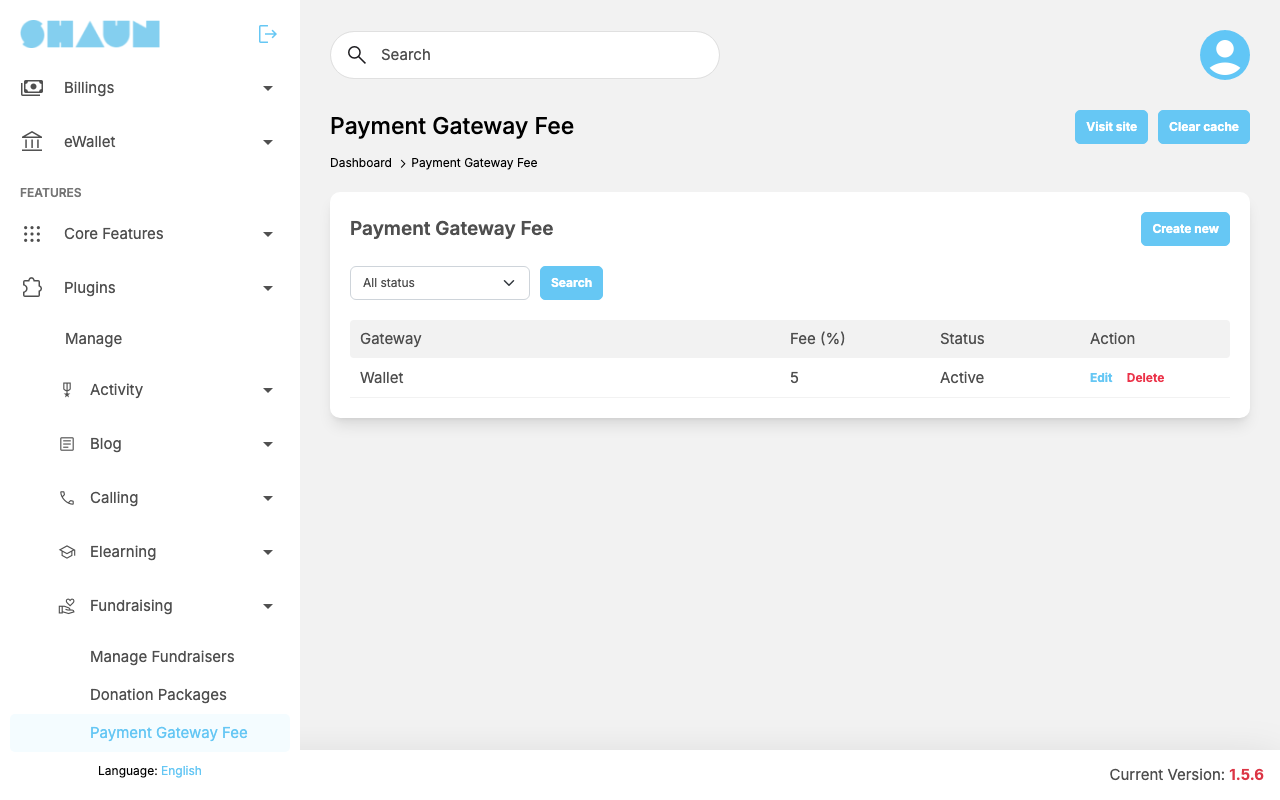
A fee is the percentage of each donation the site keeps, set separately for each payment method. A payment method with no fee (or an inactive one) passes the whole donation to the organiser. The list shows each Gateway, its Fee (%) and Status.
- Click Create new, or Edit on a row.
- Choose the Gateway: PayPal, Stripe or the eWallet. Each payment method can have one fee only; a second one shows "This gateway has been configured."
- Enter the Fee (%), from 0 to 100, and leave Active on.
- Click Submit.
What you should see: "Fee has been created." or "Fee has been updated."
A change applies to donations made afterwards. Delete removes the fee ("Fee has been deleted."); the payment method then takes no fee.
Change log#
Last updated: 2026-11-19 · v1.1.0
| Date (GMT+7) | Section | What changed |
|---|---|---|
| 2026-11-19 | gateway-fees | New page. Its sections were moved here unchanged, with links to other pages updated: "Fees per payment method" (from the former page "Set up Fundraising"). |
| 2026-11-19 | gateway-fees | First version for Fundraising 1.1.0, written from the 1.1.0 code. No donation was made while writing: the payments, the fees and the messages were read from the code, not run. |
| 2026-11-19 | screenshots | Screenshots from a demo site running Fundraising 1.1.0, where a 5% fee was set for the eWallet and the demo fundraisers had passed their end date; the Donate page was not captured because no open fundraiser exists there. |
| 2026-11-19 | all | Pages reorganised: AdminCP content now has its own pages. |