Fundraising plugin 1.1.0 / AdminCP
Settings
Admin
This page is for admins: the settings Fundraising adds.
The settings#
Last updated: 2026-11-19 · v1.1.0
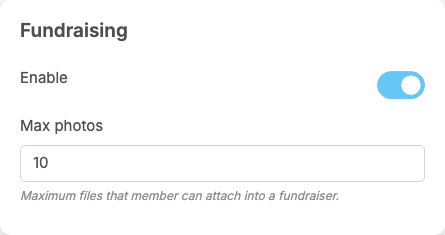
Fundraising adds a part called Fundraising to General Configuration. Each setting saves itself as soon as you change it (see Settings save themselves).
| Setting | After installing | What it does | When to change it |
|---|---|---|---|
| Enable | on | off: the Fundraisers menu item and the fundraiser posts in the feeds disappear, and fundraisers can no longer be opened or receive donations. Nothing is deleted; switch it on again and everything comes back. While it is off, fundraisers past their end date are not closed | off to pause fundraising |
| Max photos | 10 | "Maximum files that member can attach into a fundraiser.": the number of photos in a fundraiser's Gallery. More are refused with "You can only share 10 photo galleries at a time." (with your number) | lower it to keep fundraiser pages light |
These are all the settings of the plugin. The mobile apps use the same settings; there are none only for the apps.
Change log#
Last updated: 2026-11-19 · v1.1.0
| Date (GMT+7) | Section | What changed |
|---|---|---|
| 2026-11-19 | settings | New page. Its sections were moved here unchanged, with links to other pages updated: "The settings" (from the former page "Set up Fundraising"). |
| 2026-11-19 | settings | First version for Fundraising 1.1.0, written from the 1.1.0 code. No donation was made while writing: the payments, the fees and the messages were read from the code, not run. |
| 2026-11-19 | screenshots | Screenshots from a demo site running Fundraising 1.1.0, where a 5% fee was set for the eWallet and the demo fundraisers had passed their end date; the Donate page was not captured because no open fundraiser exists there. |
| 2026-11-19 | all | Pages reorganised: AdminCP content now has its own pages. |