Tourguide plugin 1.1.0 / Using Tourguide
Take a tour
Member
This page is for members and visitors: what taking a tour looks like.
Taking a tour#
Member
Last updated: 2026-11-19 · v1.1.0
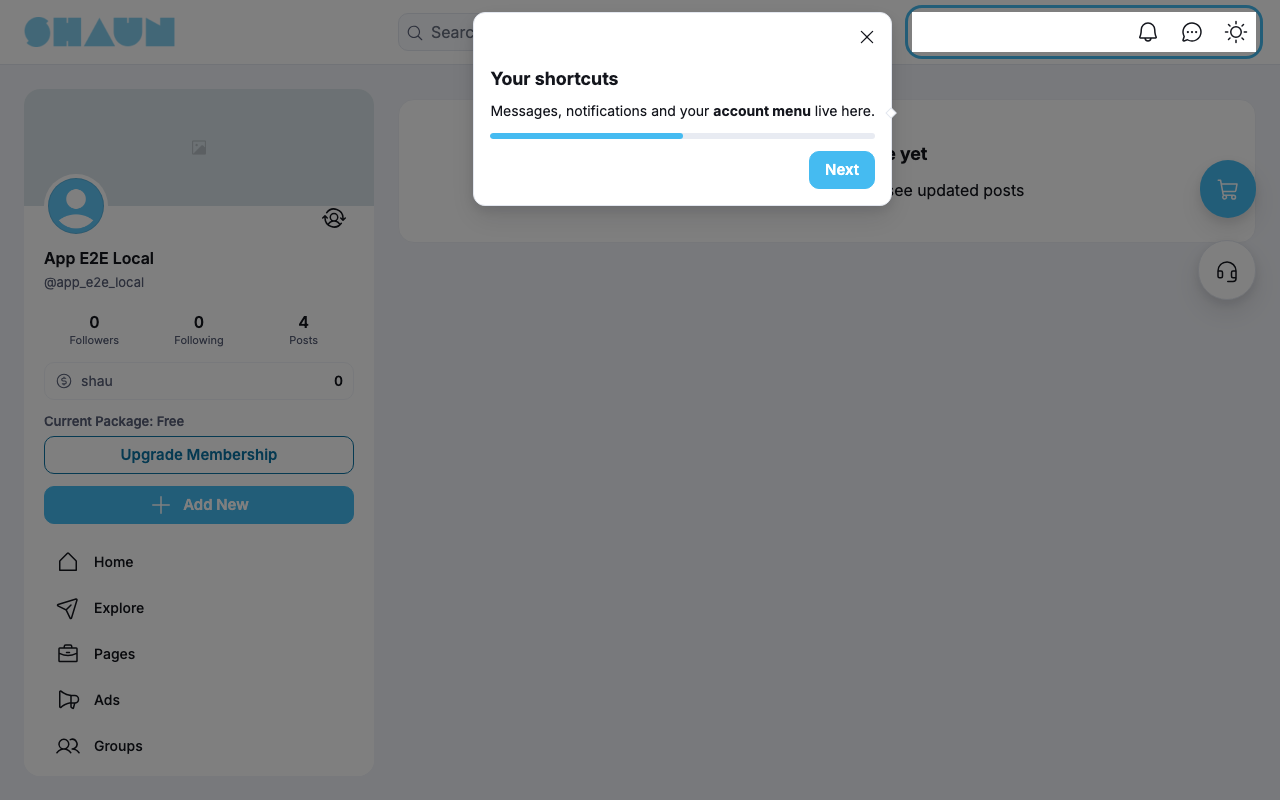
- The tour starts by itself when you open a page that has one. The first step's box appears next to the part of the page it explains, which is highlighted.
- Click Next to go on and Back to go back; the last step has Done. The bar shows how far you are.
- Click
×to stop the tour at any time. - After you finish or close it, the tour does not start again on that page, unless the site shows it every time. To take it again, click the button on the right edge of the screen (Restart tour).
- The site remembers this in your browser, not in your account: on another device or browser, or after clearing your browsing data, the tour starts again.
- The text is shown in your language when the site has written it in your language.
Change log#
Last updated: 2026-11-19 · v1.1.0
| Date (GMT+7) | Section | What changed |
|---|---|---|
| 2026-11-19 | what-members-see | New page. Its sections were moved here unchanged, with links to other pages updated: "Taking a tour" (from the former page "Set up and use Tourguide"). |
| 2026-11-19 | what-members-see | First version for Tourguide 1.1.0, written from the 1.1.0 code. The admin steps were read from the code, not run. Screenshots from a demo site running Tourguide 1.1.0 with one sample tour. |
| 2026-11-19 | all | Pages reorganised: AdminCP content now has its own pages. |