Tourguide plugin 1.1.0 / AdminCP
Settings
Admin
This page is for admins: every setting of Tourguide.
The settings#
Last updated: 2026-11-19 · v1.1.0
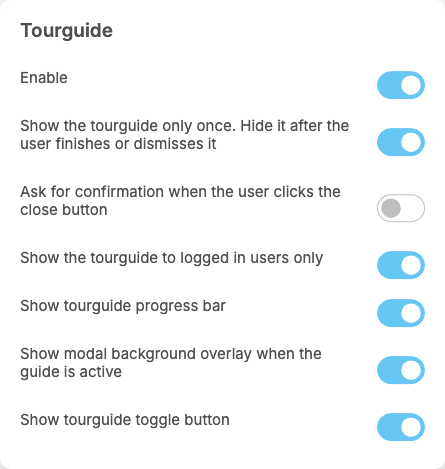
Tourguide adds a part called Tourguide at the end of General Configuration. Each setting saves itself as soon as you change it (see Settings save themselves), and applies to every tour. Visitors see a change the next time they load the site.
| Setting | After installing | What it does | When to change it |
|---|---|---|---|
| Enable | on | off: no tour shows anywhere; your tours are kept | switch it off to pause all tours, for example while you rewrite them |
| Show the tourguide only once. Hide it after the user finishes or dismisses it | on | on: once a visitor clicks Done or closes the tour, it does not start again on that page in that browser. Off: the tour starts every time the page opens | switch it off while you test a tour, or for a tour visitors should see on every visit |
| Ask for confirmation when the user clicks the close button | off | on: closing the tour with × asks "Are you sure you want to stop the tour?" first | switch it on if visitors often close a tour by mistake |
| Show the tourguide to logged in users only | on | on: only signed-in members see tours. Off: visitors who are not signed in see them too | switch it off for a tour on a page guests can open, such as a public page |
| Show tourguide progress bar | on | a bar in each step showing how far the visitor is | switch it off for very short tours |
| Show modal background overlay when the guide is active | on | darkens the rest of the page so the highlighted part stands out | switch it off if visitors should keep seeing the page clearly during the tour |
| Show tourguide toggle button | on | a button on the right edge of the screen (Restart tour) to take a finished tour again | switch it off if visitors should not restart tours |
These are all the settings of the plugin. It has no settings for the mobile apps, where tours do not appear.
Change log#
Last updated: 2026-11-19 · v1.1.0
| Date (GMT+7) | Section | What changed |
|---|---|---|
| 2026-11-19 | settings | New page. Its sections were moved here unchanged, with links to other pages updated: "The settings" (from the former page "Set up and use Tourguide"). |
| 2026-11-19 | settings | First version for Tourguide 1.1.0, written from the 1.1.0 code. The admin steps were read from the code, not run. Screenshots from a demo site running Tourguide 1.1.0 with one sample tour. |
| 2026-11-19 | all | Pages reorganised: AdminCP content now has its own pages. |