AI Assistant plugin 1.1.0 / AdminCP
Settings
Admin
This page is for admins: every setting AI Assistant adds.
The settings#
Last updated: 2026-11-19 · v1.1.0
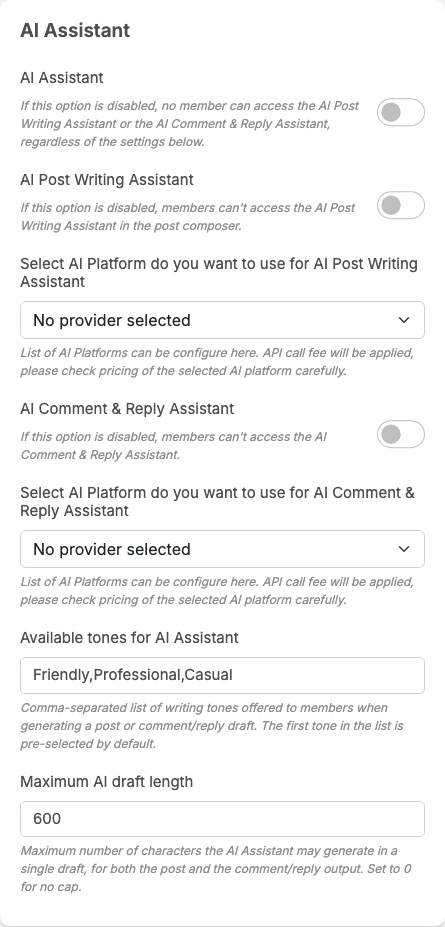
AI Assistant adds a part called AI Assistant at the end of General Configuration. Like the other settings on that screen, each one saves itself as soon as you change it (see Settings save themselves). Members see a change the next time they load the site.
| Setting | After installing | What it does | When to change it |
|---|---|---|---|
| AI Assistant | off | the main switch. Off: neither assistant works and their buttons are hidden, whatever the settings below say | switch it on when the rest is set up; switch it off to stop all AI drafting at once, for example when your AI budget runs out |
| AI Post Writing Assistant | off | on: members see AI Assist in the post composer (while the main switch is on) | switch it on once a key is picked for it |
| Select AI Platform do you want to use for AI Post Writing Assistant | No provider selected | the AI key the post assistant uses. The list shows the active keys of AI Features, grouped by provider | pick a working key before switching the post assistant on; change it to move the cost to another account or model |
| AI Comment & Reply Assistant | off | on: members see AI Comment in comment boxes and AI Reply under comments (while the main switch is on) | switch it on once a key is picked for it |
| Select AI Platform do you want to use for AI Comment & Reply Assistant | No provider selected | the AI key the comment and reply assistant uses; it may be another key than the post assistant's | as for the post assistant, for example a cheaper model for short comments |
| Available tones for AI Assistant | Friendly,Professional,Casual | the tones members can choose from, separated by commas. The first one is chosen for them at the start. The tone is passed to the AI service as an instruction | add or remove tones that suit your community, for example "Funny" or "Formal". Leave it empty and members get no tone choice |
| Maximum AI draft length | 600 | the longest draft, in characters, for posts, comments and replies. The AI service is asked to stay under it, and a longer answer is cut at that length. 0: no limit | lower it for short comments, raise it if your members write long posts. A longer draft costs more |
These are all the settings of the plugin. It has no settings for the mobile apps, which it does not support.
Change log#
Last updated: 2026-11-19 · v1.1.0
| Date (GMT+7) | Section | What changed |
|---|---|---|
| 2026-11-19 | settings | New page. Its sections were moved here unchanged, with links to other pages updated: "The settings" (from the former page "Set up and use AI Assistant"). |
| 2026-11-19 | settings | First version for AI Assistant 1.1.0, written from the 1.1.0 code. No draft was made against a real AI service: the drafts, the daily limit and the messages were read from the code, not run. The member screenshots show the assistants switched on in the browser on a demo site without an AI key, before the first draft. |
| 2026-11-19 | all | Pages reorganised: AdminCP content now has its own pages. |