AI Assistant plugin 1.1.0 / AdminCP
Permissions
Admin
This page is for admins: the permissions AI Assistant adds and the daily limit.
Permissions and the daily limit#
Last updated: 2026-11-19 · v1.1.0
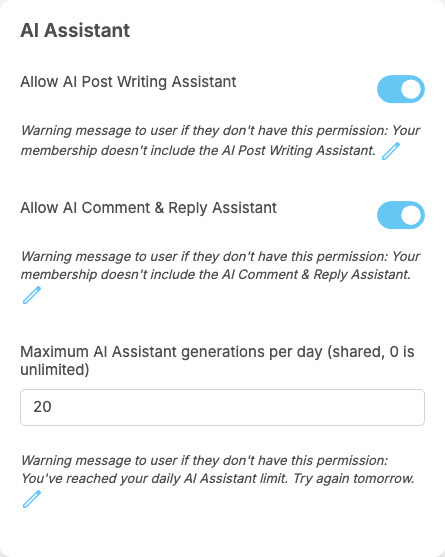
Click Permissions on a member role; the AI Assistant box holds three permissions. Change them and click Submit.
| Permission | After installing (member roles) | What it allows | Message a member sees without it |
|---|---|---|---|
| Allow AI Post Writing Assistant | on | using AI Assist in the post composer | "Your membership doesn't include the AI Post Writing Assistant." |
| Allow AI Comment & Reply Assistant | on | using AI Comment and AI Reply | "Your membership doesn't include the AI Comment & Reply Assistant." |
| Maximum AI Assistant generations per day (shared, 0 is unlimited) | 20 | how many drafts a member may get per day, posts, comments and replies together. 0: no limit | "You've reached your daily AI Assistant limit. Try again tomorrow." |
- Without a permission the button still shows. A member who clicks it gets a Permission window with the message above, and an Upgrade Now button when your site sells memberships (see Membership). So you can switch an assistant off for your free role and on for a paid one, and the free members see what they would get.
- The daily limit counts drafts that worked. Each Generate and each Regenerate that returns a draft counts one; a request that fails counts nothing. The count starts again at midnight on the server's clock. A member at the limit sees the message in the drafting window.
- Admins and moderators may always use both assistants, and the daily limit does not apply to them (see Root, super admin and moderator).
- Guests (visitors who are not signed in) never see the assistants.
- A member role you create later starts with the values of the role chosen in Inherit (see Create a role).
- The messages can be changed or translated with the pencil icon under each permission, like those of any other permission (see The permissions of a member role).
The daily limit is your main control over the cost: with 20 drafts a day, a member can cause at most 20 paid requests a day. Lower it, or set the permissions off, for roles you do not want to pay for.
Change log#
Last updated: 2026-11-19 · v1.1.0
| Date (GMT+7) | Section | What changed |
|---|---|---|
| 2026-11-19 | permissions | New page. Its sections were moved here unchanged, with links to other pages updated: "Permissions and the daily limit" (from the former page "Set up and use AI Assistant"). |
| 2026-11-19 | permissions | First version for AI Assistant 1.1.0, written from the 1.1.0 code. No draft was made against a real AI service: the drafts, the daily limit and the messages were read from the code, not run. The member screenshots show the assistants switched on in the browser on a demo site without an AI key, before the first draft. |
| 2026-11-19 | all | Pages reorganised: AdminCP content now has its own pages. |