News plugin 1.1.0 / AdminCP
News channels
This page is for admins: how to add and manage news channels, and how news is fetched and removed again.
Add and manage news channels#
Last updated: 2026-11-19 · v1.1.0
The list shows each channel's Name, Rss URL, Source, Page Name, Total Feed (articles imported so far), Last Fetch Time and Status, with Edit and Get news. Filter it with All status, All pages and Search. Drag a row by its four-arrow handle to change the order of the channel tabs on the News page.
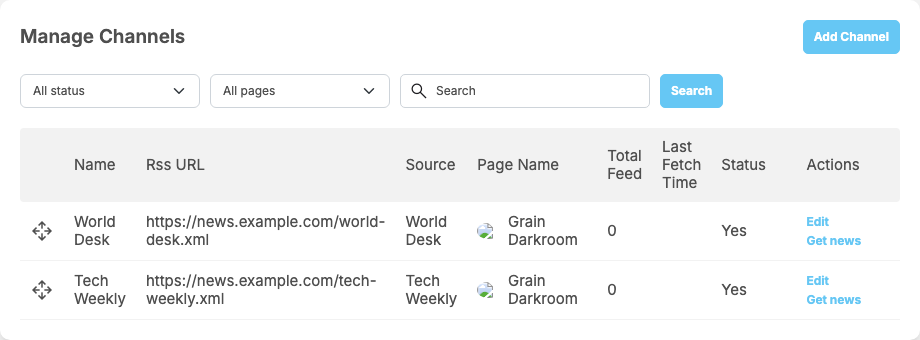
Add a channel#
- Click Add Channel.
- Fill in the form:
Field What to enter Name the channel's name, used for its tab on the News page; up to 128 characters. Translations can be added with Translate after saving Rss Address the address of the website's RSS feed, for example https://example.com/feed.xml; up to 255 characters. News sites usually link it as "RSS"Source the source name shown under each article ("Source: …"); up to 128 characters Page the business page that publishes the articles; chosen when you add the channel. Or create a new page opens a window to create one (see below) Active off: the channel is no longer read, and it is not a tab on the News page - Click Save.
What you should see: "Channel has been saved successfully." The channel is read for the first time within a few minutes, or at once with Get news.
There is no delete: to stop a channel, switch off Active.
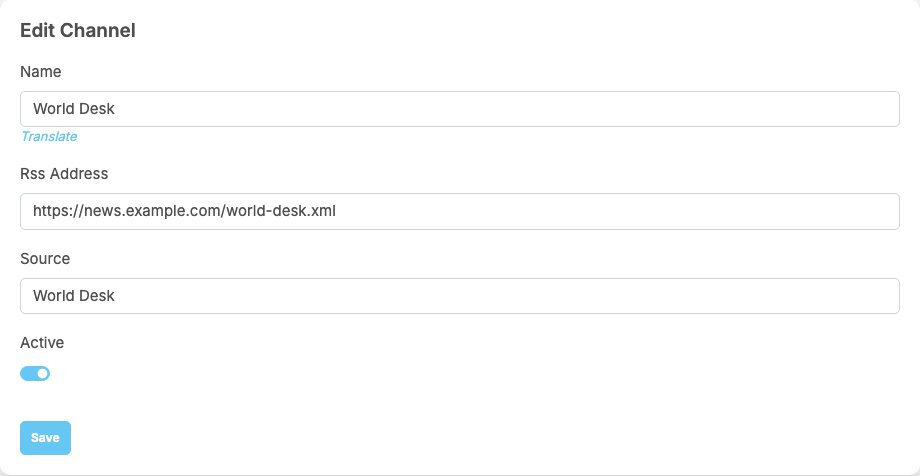
Create a page for the news#
Or create a new page opens a window to create the business page right there: Page name (up to 64 characters), Page alias (the page's address name, up to 128 characters, not used yet), Description (up to 255 characters), Categories (at least one), Hashtags and Thumbnail. Click Submit; the new page is then chosen in the form. Business pages are explained in Business pages in the ShaunSocial guide.
Get news now#
Get news reads the channel at once, after the question "Do you want to get news?". "News has been fetched successfully!" means new articles were added; "You have already fetched all news, please try again later." means there was nothing new.
How news is fetched and cleaned up#
Last updated: 2026-11-19 · v1.1.0
- Fetching. Every minute the site reads one channel that is due: one that has not been read during the last Fetch interval, the channel read least often first. With many channels, each is still read at most once per interval. Inactive channels are skipped.
- New articles only. An article already imported (the same link) is not posted again. At most Max items per fetch new articles are taken each time.
- What a news post holds: the headline, the article text (shortened, with "See more"), its first picture when there is one, a View Original Article link, the source and the article's date. It is posted as the channel's business page, so the page's followers see it like the page's other posts.
- Cleaning up. Every minute up to 100 news items older than Auto Clean Old News After are deleted, together with their posts.
Fetching and cleaning run as scheduled tasks every minute, so the site's cron job must run (see Cron job and queue). The server must be allowed to open the RSS addresses over the internet.
Change log#
Last updated: 2026-11-19 · v1.1.0
| Date (GMT+7) | Section | What changed |
|---|---|---|
| 2026-11-19 | channels, fetching | New page. Its sections were moved here unchanged, with links to other pages updated: "Add and manage news channels", "How news is fetched and cleaned up" (from the former page "Set up and use News"). |
| 2026-11-19 | channels, fetching | First version for News 1.1.0, written from the 1.1.0 code. The admin steps and the fetching were read from the code, not run. Screenshots from a demo site running News 1.1.0 with two sample channels. |
| 2026-11-19 | channels | The screenshot of the channel form was taken again: its Rss Address field now shows the placeholder address https://news.example.com/world-desk.xml. |
| 2026-11-19 | all | Pages reorganised: AdminCP content now has its own pages. |