Reaction plugin 1.1.0 / AdminCP
Settings
Admin
This page is for admins: the on/off setting of Reaction.
Switch reactions on or off#
Last updated: 2026-11-19 · v1.1.0
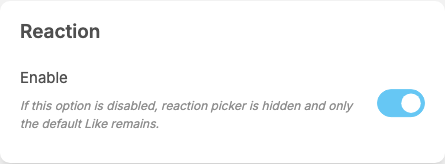
Reaction adds a part called Reaction at the end of General Configuration, with one setting. It saves itself as soon as you change it (see Settings save themselves).
| Setting | After installing | What it does | When to change it |
|---|---|---|---|
| Enable | on | "If this option is disabled, reaction picker is hidden and only the default Like remains." Members then like and unlike as without the plugin | switch it off to go back to plain likes without losing the reactions already given; switch it on again to show them |
This is the plugin's only setting. It has no settings for the mobile apps, which it does not support. Members see the change the next time they load the site.
Change log#
Last updated: 2026-11-19 · v1.1.0
| Date (GMT+7) | Section | What changed |
|---|---|---|
| 2026-11-19 | settings | New page. Its sections were moved here unchanged, with links to other pages updated: "Switch reactions on or off" (from the former page "Set up and use Reaction"). |
| 2026-11-19 | settings | First version for Reaction 1.1.0, written from the 1.1.0 code. The admin steps were read from the code, not run. Screenshots from a demo site running Reaction 1.1.0. |
| 2026-11-19 | all | Pages reorganised: AdminCP content now has its own pages. |