Resume plugin 1.1.0 / AdminCP
Settings
This page is for admins: every setting of Resume, including the AI writing tools.
The settings#
Last updated: 2026-11-19 · v1.1.0
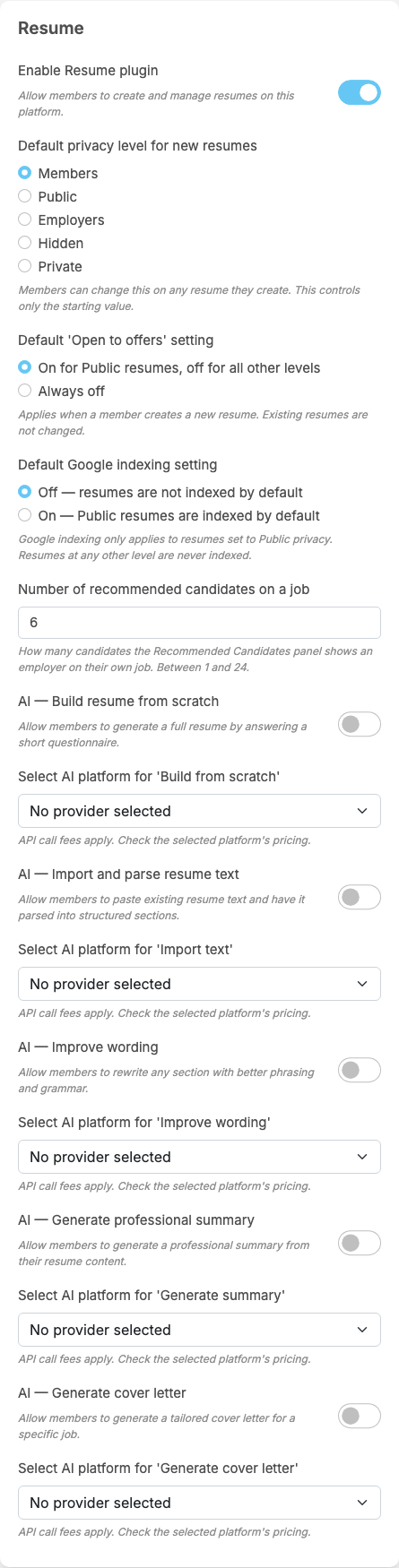
Resume adds a part called Resume to General Configuration. Each setting saves itself as soon as you change it (see Settings save themselves).
The switch and the defaults for new resumes#
| Setting | After installing | What it does |
|---|---|---|
| Enable Resume plugin | on | "Allow members to create and manage resumes on this platform." Off: the Resumes menu items are switched off and the resume pages send visitors to the home page. Resumes are kept |
| Default privacy level for new resumes | Members | the level a new resume starts with: Members, Public, Employers, Hidden or Private (see Who can see your resume). "Members can change this on any resume they create. This controls only the starting value." |
| Default 'Open to offers' setting | On for Public resumes, off for all other levels | whether a new resume starts with the "Open to offers" badge: On for Public resumes, off for all other levels or Always off. "Applies when a member creates a new resume. Existing resumes are not changed." |
| Default Google indexing setting | Off — resumes are not indexed by default | whether a new Public resume allows search engines: Off — resumes are not indexed by default or On — Public resumes are indexed by default. "Google indexing only applies to resumes set to Public privacy. Resumes at any other level are never indexed." |
| Number of recommended candidates on a job | 6 | with the Job plugin: "How many candidates the Recommended Candidates panel shows an employer on their own job. Between 1 and 24." A value outside that range counts as 1 or 24 |
The AI writing tools#
Each of the five tools has its own switch and its own AI platform, both off after installing. A tool appears to members only when its switch is on and a working provider key is picked under it; otherwise members who try it see "This AI feature is not available." The platforms offered are the keys added in AdminCP → Core Features → AI Features → Manage AI Providers (see AI providers). Under each platform list: "API call fees apply. Check the selected platform's pricing."
| Switch (off after installing) | Its platform setting (No provider selected) | What members can do |
|---|---|---|
| AI — Build resume from scratch | Select AI platform for 'Build from scratch' | "Allow members to generate a full resume by answering a short questionnaire." |
| AI — Import and parse resume text | Select AI platform for 'Import text' | "Allow members to paste existing resume text and have it parsed into structured sections." |
| AI — Improve wording | Select AI platform for 'Improve wording' | "Allow members to rewrite any section with better phrasing and grammar." |
| AI — Generate professional summary | Select AI platform for 'Generate summary' | "Allow members to generate a professional summary from their resume content." |
| AI — Generate cover letter | Select AI platform for 'Generate cover letter' | "Allow members to generate a tailored cover letter for a specific job." |
Members also need the AI permission of their role, and each role has a daily limit (see Permissions). These are all the settings of the plugin; the mobile apps have no resume screens, so there are no app settings.
Change log#
Last updated: 2026-11-19 · v1.1.0
| Date (GMT+7) | Section | What changed |
|---|---|---|
| 2026-11-19 | settings | New page. Its sections were moved here unchanged, with links to other pages updated: "The settings" (from the former page "Set up and manage Resume"). |
| 2026-11-19 | settings | First version for Resume 1.1.0, written from the 1.1.0 code. No purchase was made and no AI tool was run while writing: the payment, limits and messages were read from the code, not run. Screenshots from a demo site running Resume 1.1.0. |
| 2026-11-19 | all | Pages reorganised: AdminCP content now has its own pages. |