Calling plugin 1.1.0 / AdminCP
Permissions
Admin
This page is for admins: the permissions and the price per minute of each member role.
Permissions and prices per role#
Last updated: 2026-11-19 · v1.1.0
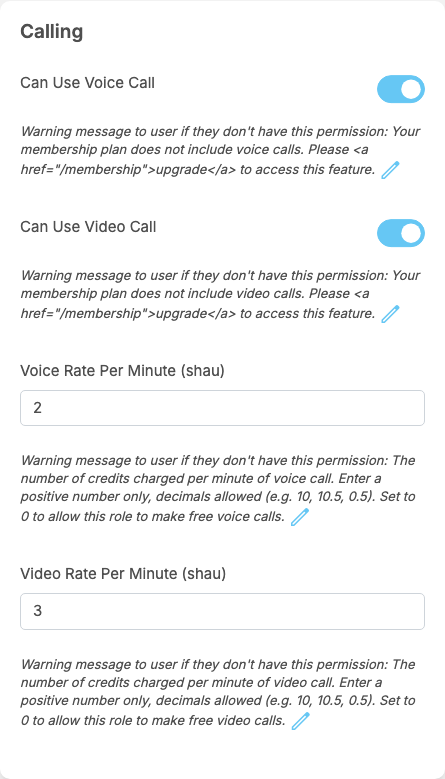
In the Calling box of a member role's Permissions (see Roles and permissions):
| Permission | After installing | What it does |
|---|---|---|
| Can Use Voice Call | on for every member role | starting voice calls. Answering a call needs no permission. Without it the member gets the warning message below |
| Can Use Video Call | on for every member role | starting video calls, in the same way |
| Voice Rate Per Minute (your token name), for example "Voice Rate Per Minute (Credits)" | 0 for every member role | the price of one minute of voice call when a member of this role pays, in eWallet tokens. Decimals are allowed, for example 0.5. 0: free |
| Video Rate Per Minute (your token name) | 0 for every member role | the price of one minute of video call, in the same way |
Each permission shows a "Warning message to user if they don't have this permission", which you can change with the pencil icon:
- Can Use Voice Call:
Your membership plan does not include voice calls. Please <a href="/membership">upgrade</a> to access this feature.Can Use Video Call:Your membership plan does not include video calls. Please <a href="/membership">upgrade</a> to access this feature.The AdminCP shows these messages with their link code, as above. Members see the message as plain text, so replace it with the pencil icon by a plain sentence, for example "Voice calls are not included in your membership. Upgrade it on the Membership page." Change it also if you do not sell memberships. - Under the two prices, the "warning message" is an explanation for you; members never see it: "The number of credits charged per minute of voice call. Enter a positive number only, decimals allowed (e.g. 10, 10.5, 0.5). Set to 0 to allow this role to make free voice calls." and "The number of credits charged per minute of video call. Enter a positive number only, decimals allowed (e.g. 10, 10.5, 0.5). Set to 0 to allow this role to make free video calls."
The price used is the one of the member who pays, at the moment the call starts. A new price applies to calls started afterwards.
Super admins and moderators may always call. Their roles have no prices, so a call they pay for is free.
For moderator roles#
In the Manage Site box of a moderator role's Permissions:
| Permission | After installing | What it allows |
|---|---|---|
| Manage Calling | off for every moderator role | the Calling Dashboard and Provider Settings screens and their menu items |
| View Call Logs | off for every moderator role | nothing more in this version: the call list is part of the Calling Dashboard, which needs Manage Calling |
Super admins always have both screens.
Change log#
Last updated: 2026-11-19 · v1.1.0
| Date (GMT+7) | Section | What changed |
|---|---|---|
| 2026-11-19 | permissions | New page. Its sections were moved here unchanged, with links to other pages updated: "Permissions and prices per role" (from the former page "Set up Calling"). |
| 2026-11-19 | permissions | First version for Calling 1.1.0, written from the 1.1.0 code. No call was made while writing: the charges, the free minutes and the messages were read from the code, not run. |
| 2026-11-19 | screenshots | Screenshots from a demo site running Calling 1.1.0 where calls were switched on and the Member role had prices of 2 and 3; the member screens (call buttons, ringing window, call screen, call cards) were not captured because no call can be made on the demo site. |
| 2026-11-19 | all | Pages reorganised: AdminCP content now has its own pages. |