Calling plugin 1.1.0 / AdminCP
Settings
Admin
This page is for admins: every setting of Calling.
The settings#
Last updated: 2026-11-19 · v1.1.0
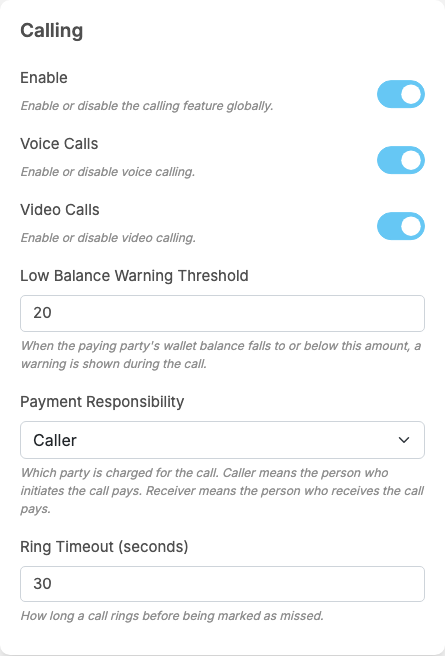
Calling adds a part called Calling to General Configuration. Each setting saves itself as soon as you change it (see Settings save themselves). Members see the change the next time they load the site or the app.
| Setting | After installing | What it does | When to change it |
|---|---|---|---|
| Enable | off | "Enable or disable the calling feature globally." Off: no call can start ("Calling is currently disabled.") and no call rings, on the website and in the apps | on when the call service is connected; off to stop all calls. When you switch it off, also switch off the two settings below so the call buttons disappear from chats |
| Voice Calls | off | "Enable or disable voice calling." On: the phone button at the top of chats. Off: voice calls cannot start ("This call type is currently disabled.") | on to offer voice calls |
| Video Calls | off | "Enable or disable video calling." On: the camera button at the top of chats. Off: video calls cannot start | on to offer video calls |
| Low Balance Warning Threshold | 20 | "When the paying party's wallet balance falls to or below this amount, a warning is shown during the call." The amount is in eWallet tokens. The warning appears only in paid calls, only to the member who pays, with a Top Up button | set it to a few minutes' worth of your highest price, so members can top up before the call ends |
| Payment Responsibility | Caller | "Which party is charged for the call. Caller means the person who initiates the call pays. Receiver means the person who receives the call pays." See Who pays, and what the site receives | choose Receiver when the people being called are the ones who profit from calls. A change applies to calls started afterwards |
| Ring Timeout (seconds) | 30 | "How long a call rings before being marked as missed." After this time the ringing stops on both sides, the call is recorded as missed and the person called gets a missed call notification | longer if members often miss calls before they reach their phone, for example 45 |
These are all the settings of this part. The mobile apps use the same settings; there are none only for the apps. On iPhones, the incoming-call screen while the app is closed also needs the core setting described in Incoming calls on iPhones (iOS VoIP push).
Change log#
Last updated: 2026-11-19 · v1.1.0
| Date (GMT+7) | Section | What changed |
|---|---|---|
| 2026-11-19 | settings | New page. Its sections were moved here unchanged, with links to other pages updated: "The settings" (from the former page "Set up Calling"). |
| 2026-11-19 | settings | First version for Calling 1.1.0, written from the 1.1.0 code. No call was made while writing: the charges, the free minutes and the messages were read from the code, not run. |
| 2026-11-19 | screenshots | Screenshots from a demo site running Calling 1.1.0 where calls were switched on and the Member role had prices of 2 and 3; the member screens (call buttons, ringing window, call screen, call cards) were not captured because no call can be made on the demo site. |
| 2026-11-19 | all | Pages reorganised: AdminCP content now has its own pages. |