Job plugin 1.1.0 / AdminCP
Manage jobs
This page is for admins: approving, rejecting and removing jobs.
Approve, reject and remove jobs#
Last updated: 2026-11-19 · v1.1.0
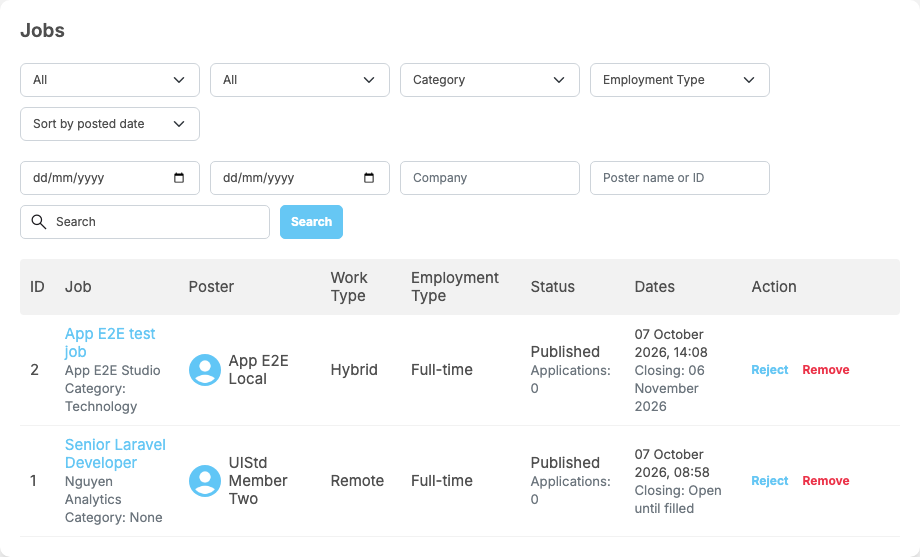
The screen Jobs lists every job with ID, Job (with company and category), Poster, Work Type, Employment Type, Status (with the number of applications) and Dates (posted and closing, or "Open until filled"). Filter by status (Draft, Pending, Published, Closed, Rejected, Removed by admin), by featured or not, category, employment type, posting dates, company, Poster name or ID and a search word, and sort by posted date, closing date or application count.
| Action | On | What happens |
|---|---|---|
| Approve | a pending job | after "Do you want to approve this job?" it goes live and the poster is told "Your job listing '[title]' has been approved and is now live." If its closing date has already passed, it is closed instead and the poster is told it has expired |
| Reject | a pending or published job | enter a Rejection reason (required, up to 500 characters). The poster is told "Your job listing '[title]' was rejected." with the reason, and can fix the job and submit it again. For a live job: "This job is live. Rejecting it takes it off the site and notifies its applicants." |
| Remove | any job not removed yet | after "Do you want to remove this job?" it is taken off the site as Removed by admin; its applicants are told it closed. The poster can no longer edit it |
| Activate | a rejected or removed job | "Do you want to activate this job? It will be published again and the poster will be notified." Applicants are told it is open again. If its closing date has passed, it comes back closed |
When approval is required, every super admin and moderator gets "… posted a new job and is waiting for your approval" for each job that waits.
Change log#
Last updated: 2026-11-19 · v1.1.0
| Date (GMT+7) | Section | What changed |
|---|---|---|
| 2026-11-19 | manage-jobs | New page. Its sections were moved here unchanged, with links to other pages updated: "Approve, reject and remove jobs" (from the former page "Set up and manage Job"). |
| 2026-11-19 | manage-jobs | First version for Job 1.1.0, written from the 1.1.0 code. No job was approved, rejected or featured while writing: those actions and their messages were read from the code, not run. Screenshots from a demo site running Job 1.1.0. |
| 2026-11-19 | all | Pages reorganised: AdminCP content now has its own pages. |