Job plugin 1.1.0 / Using Job
Post jobs and apply
This page is for members: how to find jobs, apply and follow your applications; and, for employers, how to post a job, review the applicants, close or delete a job and pay to feature it.
Find jobs#
Last updated: 2026-11-19 · v1.1.0
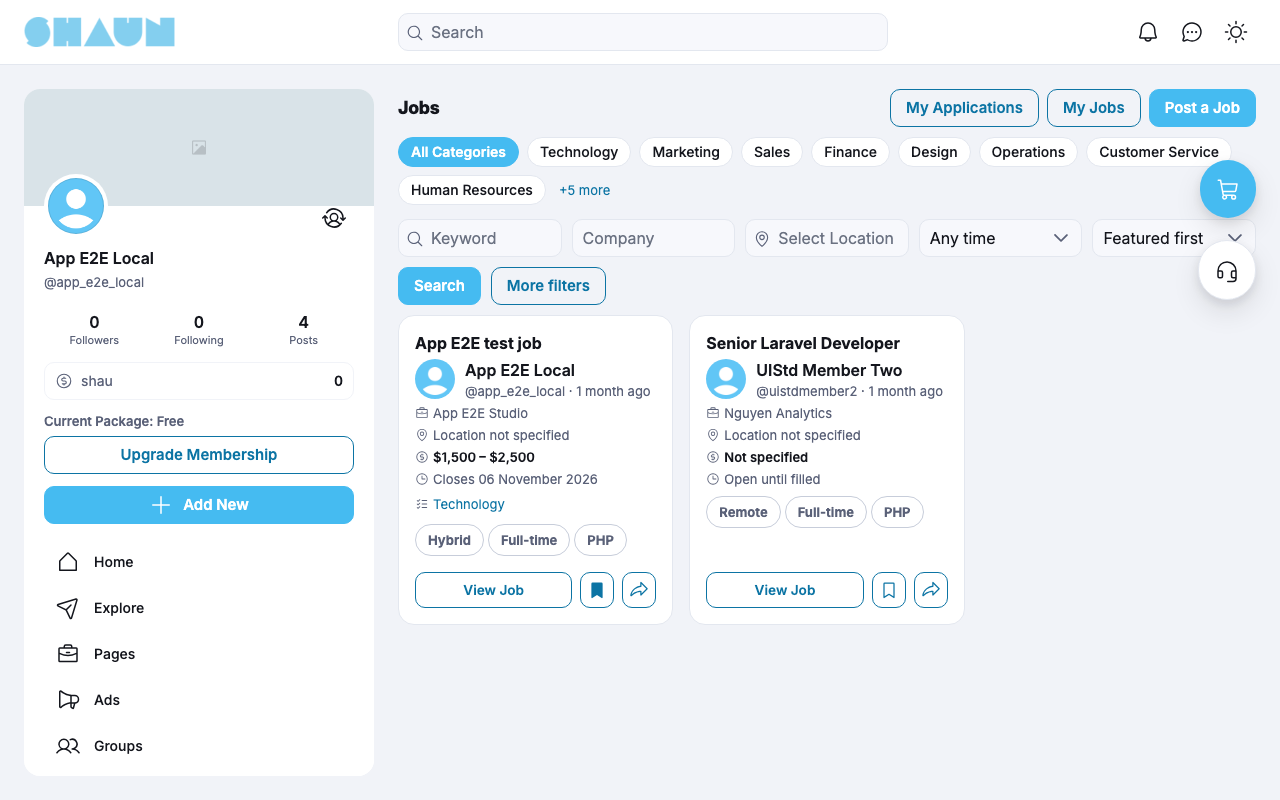
Click Jobs in the main menu. The job board lists the published jobs, with buttons to My Applications, My Jobs and Post a Job.
- Pick a category at the top (All Categories first; +[n] more shows the rest).
- Search with Keyword, Company and a location, narrow by Date posted (Any time, Last 24 hours, Last 7 days, Last 30 days) and sort by Featured first or Newest first.
- More filters adds Work Type, Employment Type, Experience Level, Education, Skills and a salary range.
- Each card shows the title, the poster, company, location, salary, closing date, category and tags, with View Job, a bookmark button and a share button.
Jobs you bookmark are in your bookmarks under Jobs. You also find jobs on the Jobs tab of a profile, in the Jobs tab of the search results, and under Lists → Jobs.
Apply for a job#
Last updated: 2026-11-19 · v1.1.0
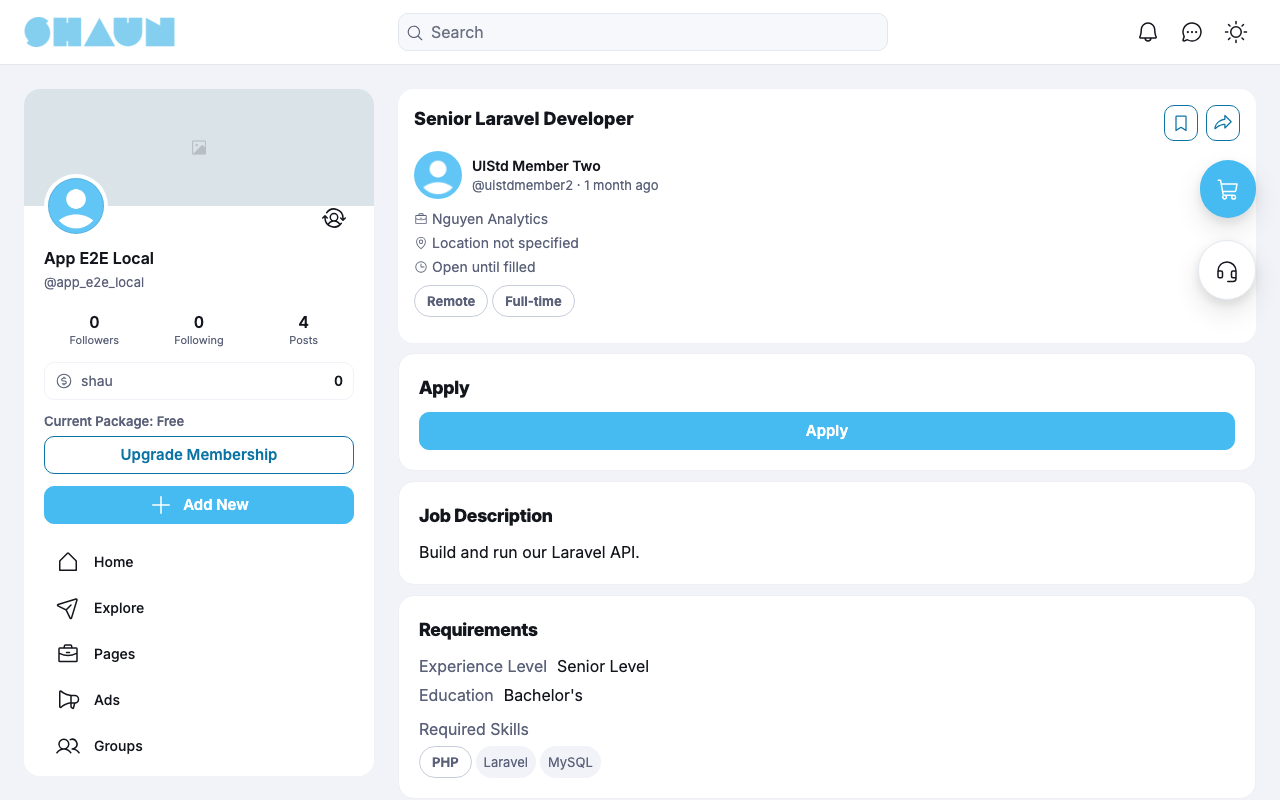
A job's page shows the details, the description, the requirements (experience level, education, required skills) and benefits. Guests see Login to Apply.
- Click Apply.
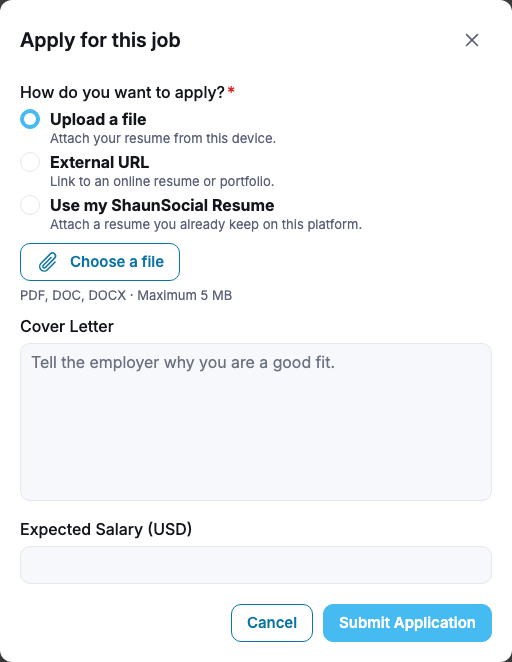
What you should see: the window "Apply for this job".
- Under How do you want to apply? choose one:
- Upload a file: "Attach your resume from this device." PDF, DOC or DOCX, up to 5 MB;
- External URL: "Link to an online resume or portfolio.";
- Use my ShaunSocial Resume, when the Resume plugin is installed: "Attach a resume you already keep on this platform."
- Optional: a Cover Letter (up to 2000 characters) and your Expected Salary.
- Click Submit Application.
What you should see: "Your application has been sent." and a notification that it was received.
- A job with "Apply on Company Website" sends you to the employer's own site: "This employer collects applications on their own website. No application is recorded here."
- "You have already applied to this job.": you can apply once while your application is open. After withdrawing you can apply again ("You applied before. Applying again creates a new application.").
- "This position is closed." and "You cannot apply to your own job." explain themselves.
- The employer sees your name and avatar, your file, link or resume, your cover letter and your expected salary.
My Applications#
Last updated: 2026-11-19 · v1.1.0
My Applications lists every application with the job, when you Applied, the Last update and its status: Submitted, Reviewed, Shortlisted, Hired, Rejected or Withdrawn. Filter by status.
- Open attachment or View Resume shows what you sent.
- Replace, while the application is still Submitted: send a new file or link. "The employer will only see the newest version."
- Withdraw, while the job is open and the application is still in progress: "Do you want to withdraw this application? This cannot be undone."
- Re-apply starts a new application for the same job.
Post a job#
Last updated: 2026-11-19 · v1.1.0
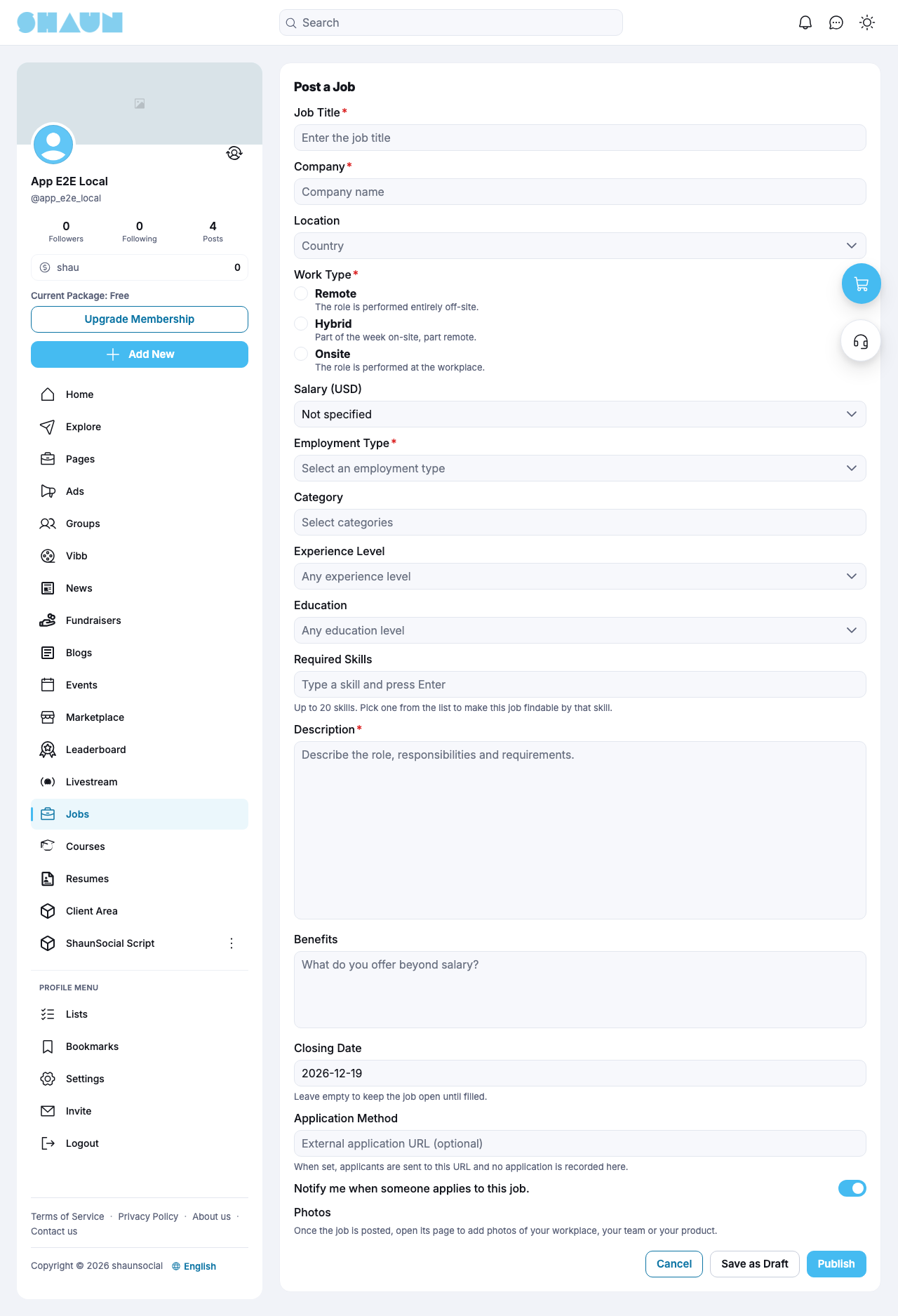
Click Post a Job on the job board, or Job in the Add New menu. If your membership does not allow it, you see "You don't have permission to post a job."
| Field | What to enter |
|---|---|
| Job Title | required, up to 200 characters (the only field a draft needs) |
| Company, Work Type, Employment Type, Description | required to publish |
| Location | optional |
| Salary | Not specified, Fixed (an amount), Range (a minimum and a maximum, the minimum lower) or Negotiable |
| Category, Experience Level, Education, Required Skills | optional; several categories and up to 20 skills |
| Benefits | "What do you offer beyond salary?" |
| Closing Date | filled in by the site (30 days ahead after installing). "Leave empty to keep the job open until filled." It must be in the future |
| External application URL (optional) | "When set, applicants are sent to this URL and no application is recorded here." |
| Notify me when someone applies to this job. | you get "… applied for '[title]'." for each application |
Click Save as Draft ("Your job has been saved as a draft.") or Publish: "Your job has been published.", or, when the site checks jobs first, "Your job is under review and will appear publicly once approved." Photos are added afterwards on the job's page (up to the number the site allows). The daily posting limit counts published jobs: "You have reached the daily job posting limit ([x] per day)."
My Jobs: edit, close and delete#
Last updated: 2026-11-19 · v1.1.0
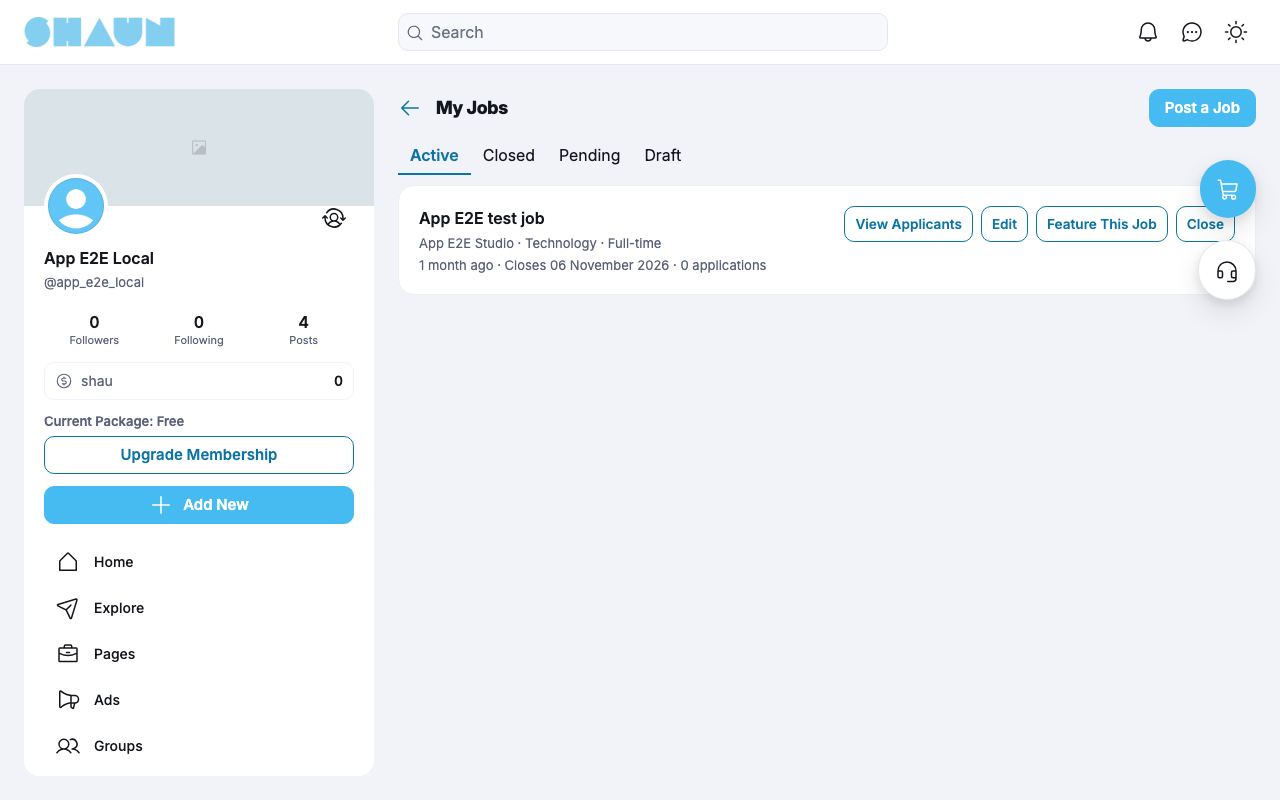
My Jobs has the tabs Active, Closed, Pending and Draft. Each job shows its company, category, type, closing date and number of applications, with:
- View Applicants (see Review applicants);
- Edit: change the job; a closed job cannot be edited. A rejected job shows the Reason; edit it and publish again to resubmit it. Moving the closing date into the past closes the job;
- Feature This Job (see Feature a job);
- Close: "Do you want to close this job? Applicants will be notified and no new applications can be submitted. Closing cannot be undone — a closed job can never be reopened, so you would have to post a new one.";
- Delete, for a closed job or a draft: "Do you want to delete this job? All applications for it will be removed." A published job must be closed first.
A job also closes by itself on its closing date; you then get "Your job listing '[title]' has expired and is now closed."
Review applicants#
Last updated: 2026-11-19 · v1.1.0
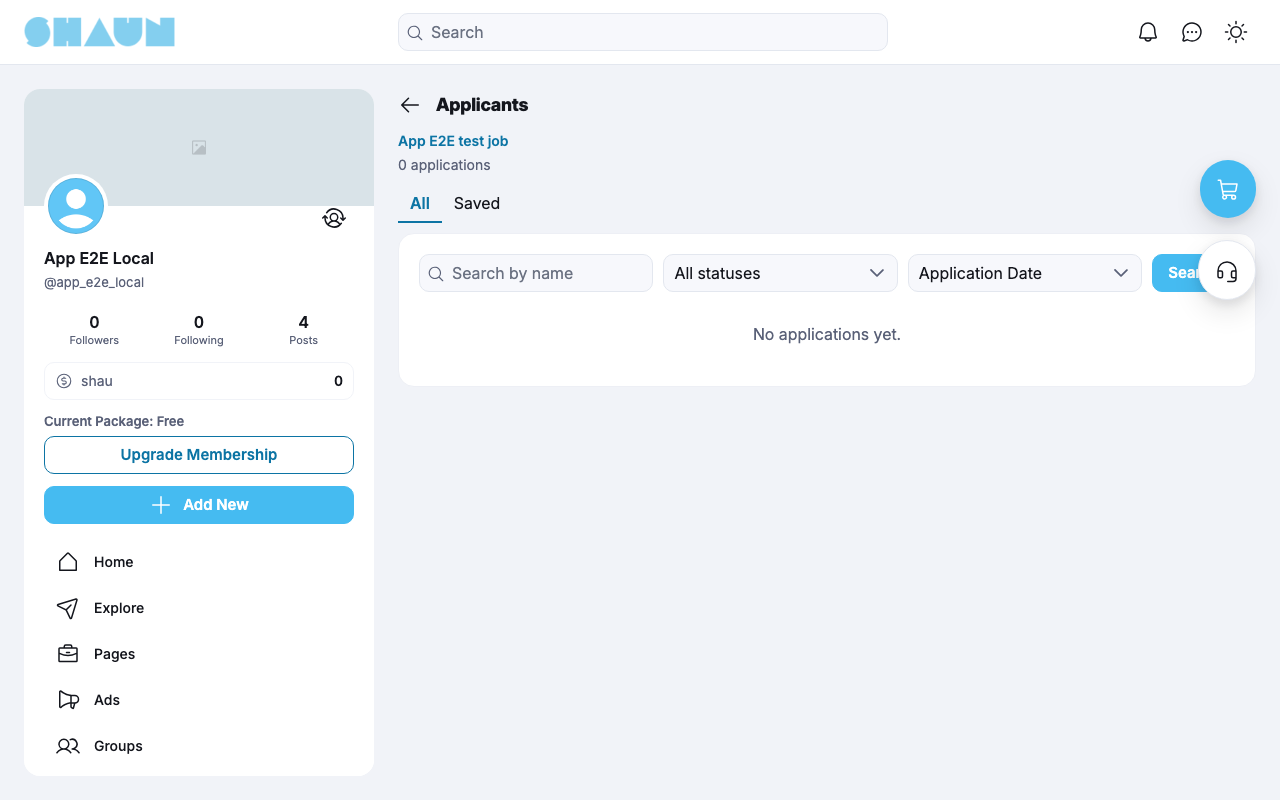
Applicants lists the applications of one job, under All or Saved. Search by name, filter by status and sort by Application Date (or Match Score Band with the Resume plugin).
- Each applicant shows the file (Download attachment) or resume (Preview Resume), the Expected Salary and the cover letter.
- Change status to Reviewed, Shortlisted, Hired or Rejected. The applicant is told when you shortlist ("You have been shortlisted for …"), hire ("Congratulations! You have been selected for …") or reject ("Your application for … was not successful at this time."). A hired, rejected or withdrawn application can no longer change: "This application is closed."
- Save candidate keeps an applicant under Saved; Remove from saved takes them off.
Feature a job#
Last updated: 2026-11-19 · v1.1.0
Featuring a published job gives it "A Featured badge on the job card.", "A highlighted card in the listing results.", "A place in the Featured Jobs section.", priority in search and in its category.
- Click Feature This Job in My Jobs or on the job's page.
- Pick a package. If your balance is too low: "Insufficient eWallet balance. Please top up your wallet." — Top up your wallet opens your eWallet (see Add funds).
- Click Confirm Purchase and enter your password.
What you should see: "Your job is now featured for [n] days." The price is taken from your eWallet and goes to the site.
- Featuring a job that is already featured adds the new days: "The package you choose is added on top of that."
- "This purchase is non-refundable." "Featured ends after [n] days, even if you close the job earlier."
The money rules for the site are in Who pays and who receives.
Notifications#
Last updated: 2026-11-19 · v1.1.0
| Who | Notification |
|---|---|
| Employer | "Your job listing '[title]' has been approved and is now live." · "Your job listing '[title]' was rejected." (with the reason) · "Your job listing '[title]' has expired and is now closed." · "… applied for '[title]'." (only when you asked to be notified) |
| Applicant | "Your application for '[title]' has been received." · "You have been shortlisted for '[title]' at '[company]'." · "Congratulations! You have been selected for '[title]' at '[company]'." · "Your application for '[title]' at '[company]' was not successful at this time." · "The job '[title]' at '[company]' that you applied for has been closed." · "The job '[title]' at '[company]' that you applied for is open again." |
| Super admins and moderators | "… posted a new job and is waiting for your approval" (when approval is required) |
Change log#
Last updated: 2026-11-19 · v1.1.0
| Date (GMT+7) | Section | What changed |
|---|---|---|
| 2026-11-19 | all | First version for Job 1.1.0, written from the 1.1.0 code. No job was posted, applied for or featured while writing: those steps and their messages were read from the code, not run. Screenshots from a demo site running Job 1.1.0 with the Resume plugin installed. |
| 2026-11-19 | all | Pages reorganised: AdminCP content now has its own pages. |