Job plugin 1.1.0 / AdminCP
Permissions
Admin
This page is for admins: the permissions of Job.
Permissions#
Last updated: 2026-11-19 · v1.1.0
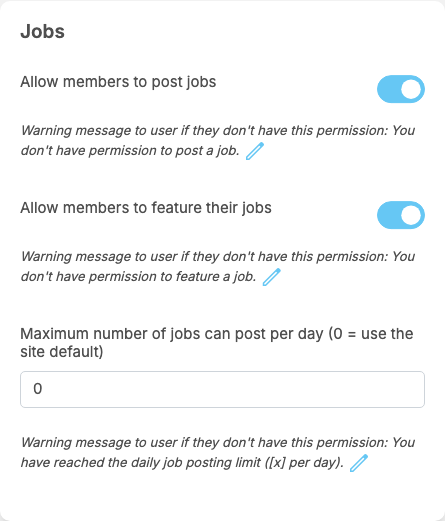
A member role's Permissions page has a box Jobs. Browsing jobs and applying need no permission.
| Permission | After installing (every member role) | What it does | Message when refused |
|---|---|---|---|
| Allow members to post jobs | on | posting and saving draft jobs | "You don't have permission to post a job." |
| Allow members to feature their jobs | on | buying Featured placement for their own published jobs | "You don't have permission to feature a job." |
| Maximum number of jobs can post per day (0 = use the site default) | 0 | this role's own daily posting limit. 0 means the role uses Maximum jobs a member may post per day from the settings | "You have reached the daily job posting limit ([x] per day)." ([x] is the limit) |
- The messages are under each permission; change them with the pencil icon.
- Super admins and moderators have no daily limit.
- A business page can post jobs too; every admin of the page can then manage those jobs and their applicants.
The moderator permissions#
On a moderator role's Permissions page, the box Jobs has two switches, off after installing:
| Permission | What it opens |
|---|---|
| Manage Jobs | Manage Jobs and Featured Packages; the moderator can also see the applicants of any job |
| Manage Job Categories | the six lists: categories, employment types, skills, work types, experience levels and education levels |
Super admins always have both.
Change log#
Last updated: 2026-11-19 · v1.1.0
| Date (GMT+7) | Section | What changed |
|---|---|---|
| 2026-11-19 | permissions | New page. Its sections were moved here unchanged, with links to other pages updated: "Permissions" (from the former page "Set up and manage Job"). |
| 2026-11-19 | permissions | First version for Job 1.1.0, written from the 1.1.0 code. No job was approved, rejected or featured while writing: those actions and their messages were read from the code, not run. Screenshots from a demo site running Job 1.1.0. |
| 2026-11-19 | all | Pages reorganised: AdminCP content now has its own pages. |