Job plugin 1.1.0 / AdminCP
Settings
Admin
This page is for admins: every setting of Job.
The settings#
Last updated: 2026-11-19 · v1.1.0
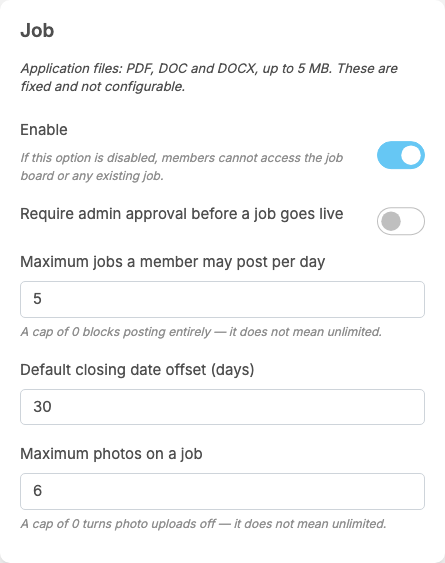
Job adds a part called Job to General Configuration. Each setting saves itself as soon as you change it (see Settings save themselves).
| Setting | After installing | What it does |
|---|---|---|
| Enable | on | "If this option is disabled, members cannot access the job board or any existing job." The Jobs menu items are switched off too |
| Require admin approval before a job goes live | off | on: a job a member publishes waits as Pending until an admin approves it (see Approve, reject and remove jobs). A job resubmitted after a rejection waits again |
| Maximum jobs a member may post per day | 5 | the daily posting limit for roles that do not set their own (see Permissions). "A cap of 0 blocks posting entirely — it does not mean unlimited." Drafts do not count; a draft counts the day it is published |
| Default closing date offset (days) | 30 | the closing date already filled in on the Post a Job form: that many days from today. The member can change it or leave it empty ("open until filled"). 0: the field starts empty |
| Maximum photos on a job | 6 | how many photos an employer can add to a job. "A cap of 0 turns photo uploads off — it does not mean unlimited." |
These are all the settings of the plugin; the mobile apps have no job screens, so there are no app settings.
Change log#
Last updated: 2026-11-19 · v1.1.0
| Date (GMT+7) | Section | What changed |
|---|---|---|
| 2026-11-19 | settings | New page. Its sections were moved here unchanged, with links to other pages updated: "The settings" (from the former page "Set up and manage Job"). |
| 2026-11-19 | settings | First version for Job 1.1.0, written from the 1.1.0 code. No job was approved, rejected or featured while writing: those actions and their messages were read from the code, not run. Screenshots from a demo site running Job 1.1.0. |
| 2026-11-19 | all | Pages reorganised: AdminCP content now has its own pages. |