Viewed Me plugin 1.1.0 / AdminCP
Permissions
This page is for admins: the one permission of Viewed Me.
Who may see private visitors#
Last updated: 2026-11-19 · v1.1.0
A member who browses privately shows up as "Private name" in the Viewed me list of the people they visit. The permission See profile who view you privately lets the members of a role see who it really was: their name, their picture and a link to their profile.
| Role | After installing |
|---|---|
| Member, and every other member role that exists when you install | off; you can switch it on per role |
| Super admin | always allowed: super admins see who a private visitor is (see Root, super admin and moderator) |
| Moderator roles | always allowed: moderators see who a private visitor is; the permission is not listed on their Permissions page |
| Guest | not offered: visitors who are not signed in have no Viewed me page |
- A member role you create later starts with whatever the role chosen in Inherit has (see Create a role).
- Because it is off for everyone to start with, it works well as a benefit of a paid member level: switch it on only for the role members get when they subscribe (see Membership in the ShaunSocial guide).
- Open AdminCP → Users → Manage User Roles and click Permissions on the member role.
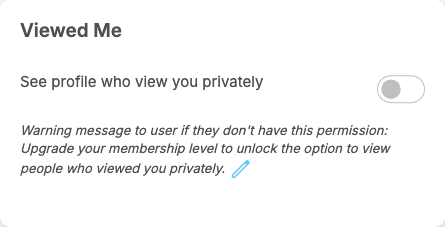
- In the Viewed Me box, switch on See profile who view you privately.
- Click Submit.
What you should see: members of that role now see the real people behind private visits on their Viewed me page, after reloading it.
Under the switch, "Warning message to user if they don't have this permission" shows the message "Upgrade your membership level to unlock the option to view people who viewed you privately." You can change or translate it with the pencil icon, like the message of any other permission (see The permissions of a member role). The Viewed me page itself does not show it: a member without the permission simply sees private visitors as "Private name".
Change log#
Last updated: 2026-11-19 · v1.1.0
| Date (GMT+7) | Section | What changed |
|---|---|---|
| 2026-11-19 | permission | New page. Its sections were moved here unchanged, with links to other pages updated: "Who may see private visitors" (from the former page "Set up and use Viewed Me"). |
| 2026-11-19 | permission | First version for Viewed Me 1.1.0, written from the 1.1.0 code. The admin steps were read from the code, not run. Screenshots from a site running Viewed Me 1.1.0. |
| 2026-11-19 | all | Pages reorganised: AdminCP content now has its own pages. |