Elearning plugin 1.1.0 / AdminCP
Course categories
Admin
This page is for admins: the course categories.
Course categories#
Last updated: 2026-11-19 · v1.1.0
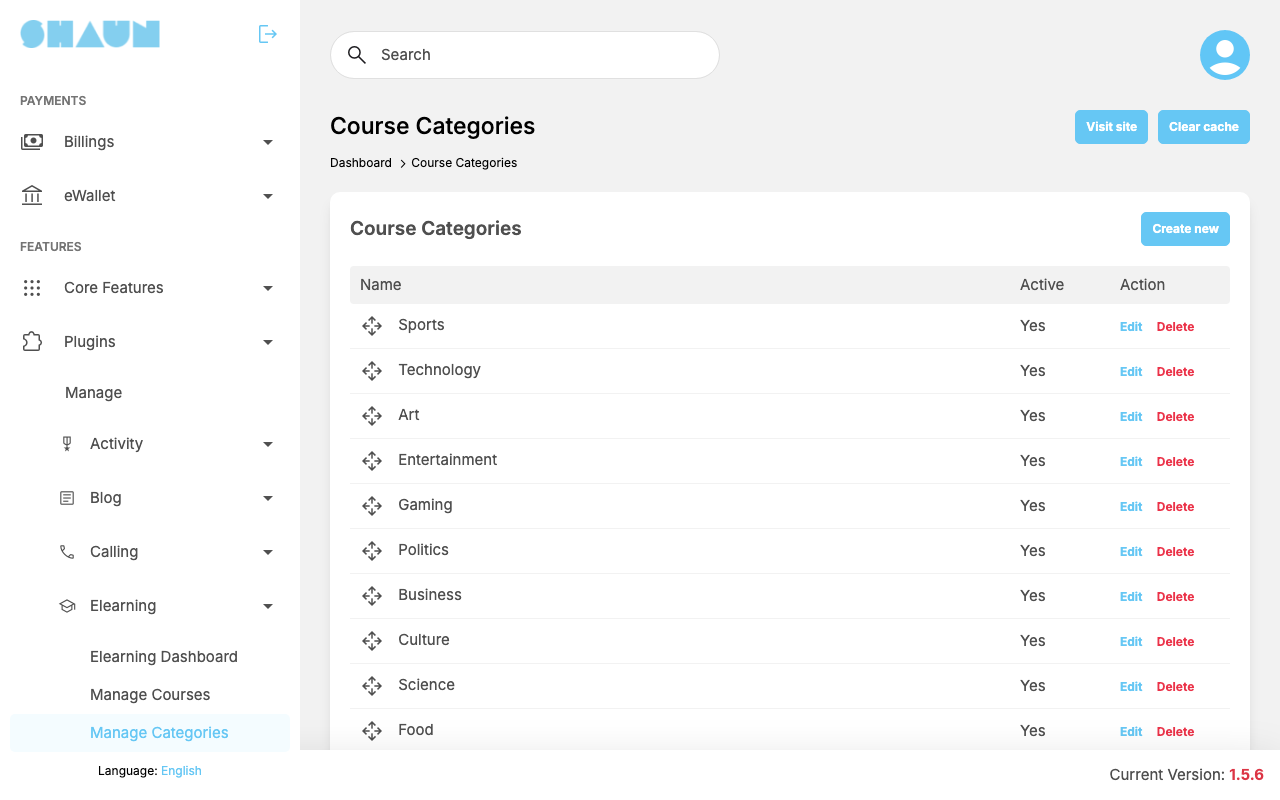
Course creators put their course in one or more categories, and members filter the course list by category. After installing there are 15: Sports, Technology, Art, Entertainment, Gaming, Politics, Business, Culture, Science, Food, Animals, Education, Fashion & Beauty, Health & Fitness and News. The screen is called Course Categories.
- Click Create new, or Edit on a category.
- Enter the Name. To make it a sub-category, choose a Parent; there is one level of sub-categories. Leave Active ticked.
- Click Submit.
What you should see: "Course category has been created." or "Course category has been successfully updated."
- Drag a category by its arrows to change the order members see.
- To show the name in another language, edit the category and click Translate ("*You can add translation language after creating.").
- Delete removes the category and its sub-categories ("Course category has been deleted."). Courses stay; they simply no longer show that category. To stop members choosing a category, delete it.
Change log#
Last updated: 2026-11-19 · v1.1.0
| Date (GMT+7) | Section | What changed |
|---|---|---|
| 2026-11-19 | categories | New page. Its sections were moved here unchanged, with links to other pages updated: "Course categories" (from the former page "Set up Elearning"). |
| 2026-11-19 | categories | First version for Elearning 1.1.0, written from the 1.1.0 code. The payment, the fee and the wallet lines were read from the code and checked once on a demo site, where one member bought a 5-token course from another with the eWallet. |
| 2026-11-19 | screenshots | Screenshots from a demo site running Elearning 1.1.0, with demo courses. |
| 2026-11-19 | all | Pages reorganised: AdminCP content now has its own pages. |