Elearning plugin 1.1.0 / AdminCP
Settings
Admin
This page is for admins: the settings Elearning adds.
The settings#
Last updated: 2026-11-19 · v1.1.0
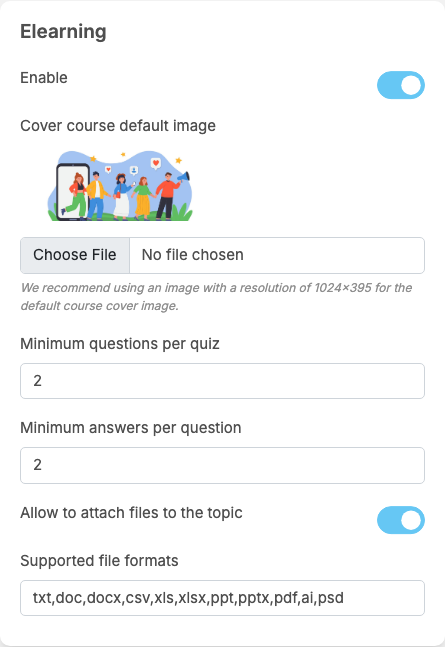
Elearning adds a part called Elearning to General Configuration. Each setting saves itself as soon as you change it (see Settings save themselves).
| Setting | After installing | What it does | When to change it |
|---|---|---|---|
| Enable | on | off: the Courses menu items disappear, courses can no longer be opened, taken or created, they leave the search, and the Courses row leaves the AdminCP dashboard. Nothing is deleted; switch it on again and everything comes back | off to pause courses |
| Cover course default image | empty: the built-in picture | the cover shown for a course that has no cover of its own. "We recommend using an image with a resolution of 1024x395 for the default course cover image." | to use a picture in your site's style |
| Minimum questions per quiz | 2 | a quiz can be published only when it has at least this many questions; before that it stays a draft ("Quiz must have at least 2 questions to publish.", with your number). When a question is deleted from a published quiz and fewer remain, the quiz goes back to draft and students' passes of it are removed. 0: a quiz can be published with any number of questions | raise it for longer quizzes |
| Minimum answers per question | 2 | each quiz question must have at least this many answer options. The question form starts with this many empty answers, on the website and in the mobile apps. On the website it says "At least 2 answers are required." (with your number) and refuses to remove an option below it ("A minimum of 2 answer options is required.") | raise it to 3 or 4 for harder questions |
| Allow to attach files to the topic | on | lets course creators and instructors attach files that students can download from a lesson. Off: new files are refused with "File attachments are disabled."; files already attached stay on the lessons | off if you do not want files on your server |
| Supported file formats | txt,doc,docx,csv,xls,xlsx,ppt,pptx,pdf,ai,psd | the file types allowed as lesson attachments, as file extensions separated by commas. Other files are refused with "This file format is not supported." | add or remove types, for example zip |
These are all the settings of the plugin. The mobile apps use the same settings; there are none only for the apps. How many files one lesson may have is a permission, not a setting: Maximum files can be attached per lesson (see Permissions).
Change log#
Last updated: 2026-11-19 · v1.1.0
| Date (GMT+7) | Section | What changed |
|---|---|---|
| 2026-11-19 | settings | New page. Its sections were moved here unchanged, with links to other pages updated: "The settings" (from the former page "Set up Elearning"). |
| 2026-11-19 | settings | First version for Elearning 1.1.0, written from the 1.1.0 code. The payment, the fee and the wallet lines were read from the code and checked once on a demo site, where one member bought a 5-token course from another with the eWallet. |
| 2026-11-19 | screenshots | Screenshots from a demo site running Elearning 1.1.0, with demo courses. |
| 2026-11-19 | all | Pages reorganised: AdminCP content now has its own pages. |