Elearning plugin 1.1.0 / AdminCP
Manage courses
Admin
This page is for admins: managing courses in the AdminCP.
Manage courses#
Last updated: 2026-11-19 · v1.1.0
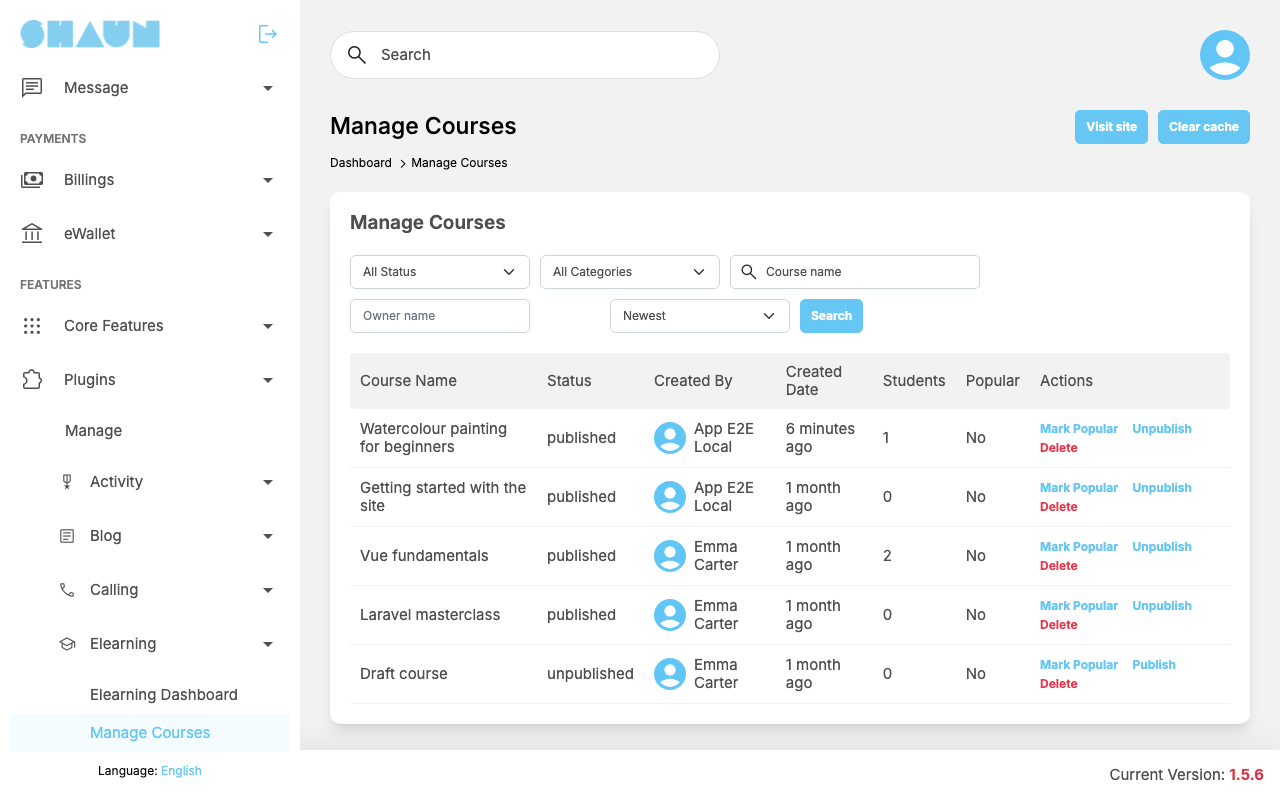
The list shows every course, published or not, with the Course Name, the Status (published or unpublished), Created By, Created Date, the number of Students and whether it is Popular. Filter by status, category, Course name or Owner name, sort by Newest, Oldest, Most Enrollments or Low Enrollments, and click Search.
- Mark Popular / Remove Popular puts a course in, or takes it out of, the Popular Courses block on the right of the Courses page ("Course marked as popular." / "Course removed from popular."). The block shows up to 5 published popular courses, those with the most students first, and is hidden while none is marked. You can place it on other pages with the layout editor (see Layout editor).
- Unpublish / Publish hides a course from the course lists, search and new students, or shows it again ("Course has been unpublished." / "Course has been published."). Its students keep their access.
- Delete removes a course with its sections, lessons, files, quizzes, results, posts, students, instructors and reviews ("Course has been deleted."). A course that a student has paid for cannot be deleted: "Students have paid for this course, so it cannot be deleted. Unpublish it instead." Members cannot delete their courses themselves; they unpublish them.
Change log#
Last updated: 2026-11-19 · v1.1.0
| Date (GMT+7) | Section | What changed |
|---|---|---|
| 2026-11-19 | manage-courses | New page. Its sections were moved here unchanged, with links to other pages updated: "Manage courses" (from the former page "Set up Elearning"). |
| 2026-11-19 | manage-courses | First version for Elearning 1.1.0, written from the 1.1.0 code. The payment, the fee and the wallet lines were read from the code and checked once on a demo site, where one member bought a 5-token course from another with the eWallet. |
| 2026-11-19 | screenshots | Screenshots from a demo site running Elearning 1.1.0, with demo courses. |
| 2026-11-19 | all | Pages reorganised: AdminCP content now has its own pages. |