Elearning plugin 1.1.0 / AdminCP
Permissions
Admin
This page is for admins: the Elearning permissions of member and moderator roles.
Permissions#
Last updated: 2026-11-19 · v1.1.0
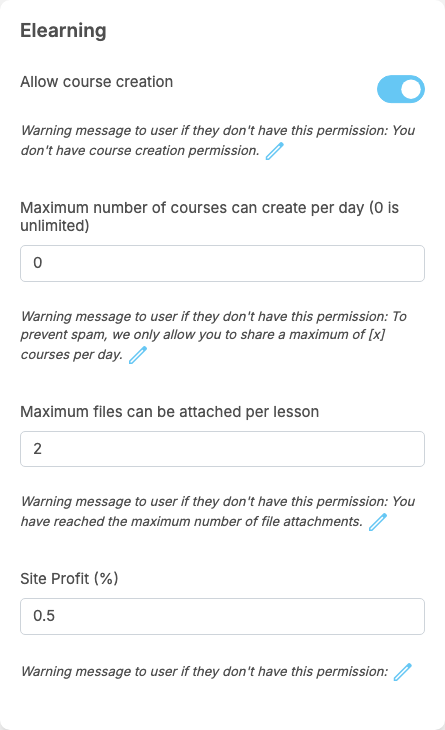
The member permissions are in the Elearning box of each member role. Installing gives them the values below on every member role that exists at that moment; a role you create later copies the values of the role it inherits from (see Create a role).
| Permission | After installing | What it allows or limits | When it refuses |
|---|---|---|---|
| Allow course creation | on for every member role | creating courses | clicking Create new course or Add New → Course shows the warning message under the permission: "You don't have course creation permission." |
| Maximum number of courses can create per day (0 is unlimited) | 0 (unlimited) | how many courses a member may create per day | "To prevent spam, we only allow you to share a maximum of [x] courses per day." with your number for [x] |
| Maximum files can be attached per lesson | 2 | how many files one lesson may have; the limit of the member who adds the file counts. 0: no limit | the warning message under the permission reads "You have reached the maximum number of file attachments."; when a member adds one file too many to a lesson, the site shows "Maximum number of attachments reached." |
| Site Profit (%) | 0.5 | the percentage of each paid course the site keeps, taken from the role of the course creator (see Paid courses: who pays, who receives). Enter a number from 0 to 100; decimals such as 2.5 are allowed | never: it is a value, not a switch. Its warning message is empty and is not shown |
The AdminCP permissions are in the Manage Site box of a moderator role:
| Permission | After installing | What it allows |
|---|---|---|
| Manage Courses | off | the Manage Courses screen. A moderator with it can also open every course, also an unpublished one, with its lessons and quizzes |
| Manage Categories | off | the Manage Categories screen |
| Manage Dashboard | off | the Elearning Dashboard screen |
- Taking a course needs no permission: every member can take a course. Visitors who are not signed in can look at courses but must sign in to take one.
- Super admins and moderators may always create courses, without a daily limit and without a limit on files per lesson. Super admins always have the three AdminCP screens.
Change log#
Last updated: 2026-11-19 · v1.1.0
| Date (GMT+7) | Section | What changed |
|---|---|---|
| 2026-11-19 | permissions | New page. Its sections were moved here unchanged, with links to other pages updated: "Permissions" (from the former page "Set up Elearning"). |
| 2026-11-19 | permissions | First version for Elearning 1.1.0, written from the 1.1.0 code. The payment, the fee and the wallet lines were read from the code and checked once on a demo site, where one member bought a 5-token course from another with the eWallet. |
| 2026-11-19 | screenshots | Screenshots from a demo site running Elearning 1.1.0, with demo courses. |
| 2026-11-19 | all | Pages reorganised: AdminCP content now has its own pages. |