ShaunSocial user guide 1.5.6 / Getting started
What ShaunSocial core includes
ShaunSocial 1.5.6 comes as one package with everything a community site needs: member accounts and the news feed, chat, stories, groups, events, business pages, a marketplace, payments and the AdminCP to run it all. Plugins are extras you add on top. This page lists what is in the package, explains how plugins differ, and shows how this guide is organised.
What is in the 1.5.6 package#
Last updated: 2026-11-17 · v1.5.6
Everything below is installed together when you install ShaunSocial. You do not buy, upload or install these parts one by one, and they are not plugins: they are part of ShaunSocial itself and are upgraded with it.
The site and the AdminCP#
| Area | What it gives you | Where you manage it |
|---|---|---|
| Members | sign-up and sign-in (with two-factor sign-in and passkeys), profiles, following, member roles, verification badges | AdminCP → Users |
| News feed and posts | text, photo, video and poll posts, comments, hashtags, bookmarks, search, notifications | AdminCP → Site Settings → General Configuration |
| Chat | private and group messages between members; an AI chat bot can be added (see AI Features below) | AdminCP → Site Settings → General Configuration → Chat |
| Moderation | reports from members, the Moderation Center, appeals | AdminCP → Report → Moderation Center |
| Look and content | themes and colours, menus, the layout editor, static pages such as Terms of Service | AdminCP → Design, AdminCP → Static Page |
| Languages | several languages for your site, with automatic translation of members' posts | AdminCP → Language |
| e-mail templates and bulk e-mails to your members | AdminCP → Site Settings → Mail Templates, Bulk Email | |
| System | cache, file storage, scheduled tasks, logs | AdminCP → System Setting |
The features under "Core Features"#
In the AdminCP these sit in the menu group Core Features (under the heading Features). Groups, Events, Business Pages, Vibb, Marketplace, Paid Content and Advertising each have an Enable switch in AdminCP → Site Settings → General Configuration, in their own section, if your community does not need them.
| Feature | What members can do | On after installing? |
|---|---|---|
| Story | share photos and videos that disappear after a set time | yes |
| Business Pages | create pages for a business or brand, with followers, reviews and verification | yes |
| Groups | create public or private groups with their own feed | yes |
| Events | create events, invite people and answer invitations | yes |
| Vibb | post short videos with music | yes, but it needs video processing (FFmpeg) on your server, see Video and photo processing |
| Marketplace | list things for sale and contact sellers | yes |
| Paid Content | creators sell paid posts and profile subscriptions, and receive tips | yes |
| Advertising | create ads and boost posts, paid from their wallet | yes |
| AI Features | an AI chat bot for members, and automatic checks of the text and photos of new posts, comments and replies for inappropriate content (videos are not checked; see AI features) | no: add an AI provider key in AdminCP → Core Features → AI Features → Manage AI Providers, then switch on ChatBot and each check you want, and pick a provider for each, in AdminCP → Site Settings → General Configuration → AI Features |
Payments#
- Membership: paid (or free) membership plans for your members (AdminCP → Membership → Manage Packages).
- eWallet: members top up a wallet and pay for ads, paid content and more from it (AdminCP → eWallet).
- Payment gateways: the payment providers your members pay through (AdminCP → Billings → Manage Payment Gateways).
Which version you have#
Two places show your true version: the bottom of every AdminCP page, next to Current Version, and the
file public/version.txt of your site.
What you should see: Current Version: 1.5.6.

Core features and plugins#
Last updated: 2026-11-17 · v1.5.6
Core features
Everything on the list above. Installed with ShaunSocial, upgraded with it, managed in their own AdminCP menus. You never upload them.
Plugins
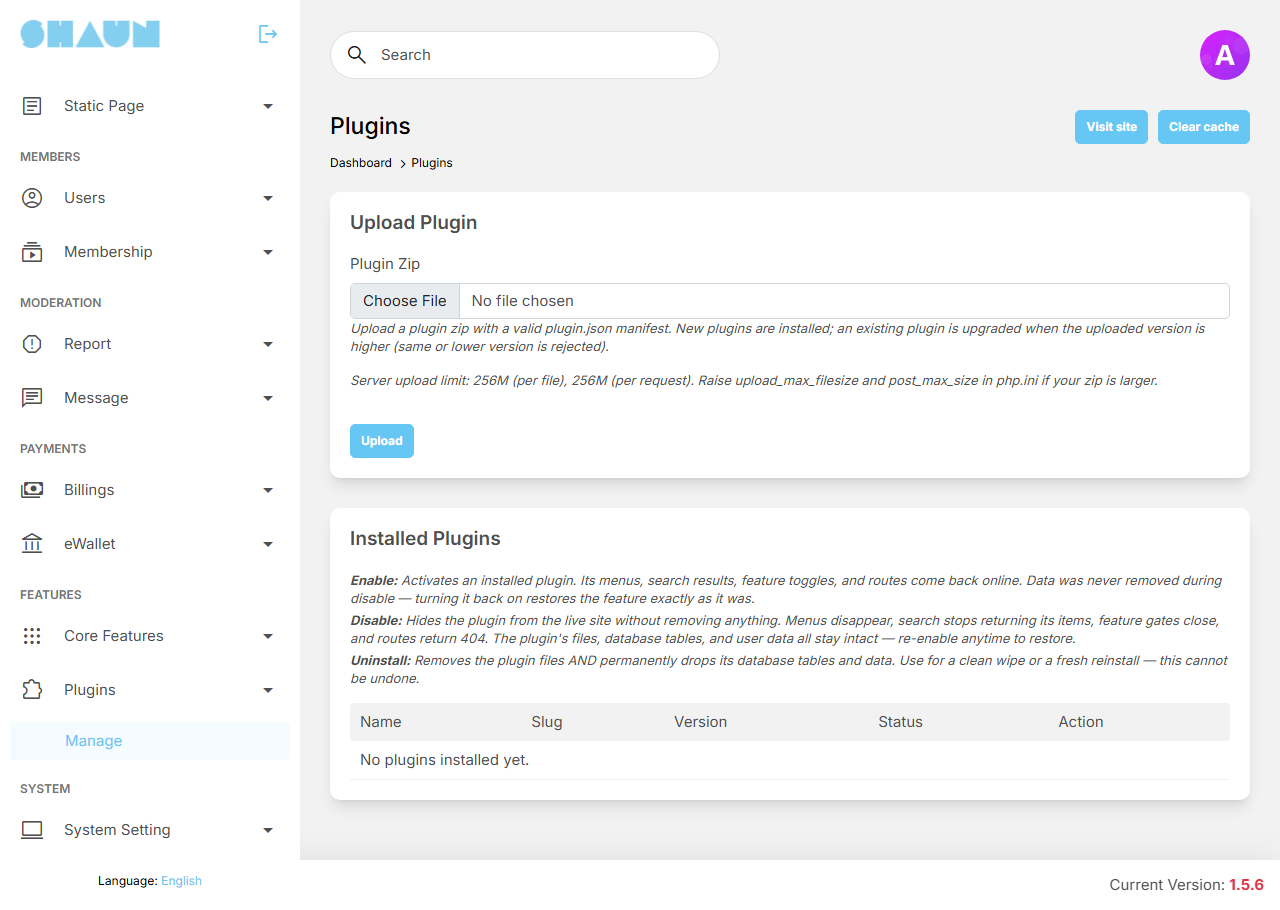
Extra features you get separately and upload yourself, as a zip file, in AdminCP → Plugins → Manage. Each plugin has its own version and its own updates.
Where plugins appear in the AdminCP#
All plugins live under one menu group, Plugins. Its first item, Manage, is where you upload, enable, disable and uninstall plugins. Each installed plugin that has settings adds its own item below it. The Plugins page covers the plugin manager step by step.
A plugin licence belongs to one domain#
A licensed plugin you download is made for one domain: the one you give when you get it. Your site checks this on every visit. When such a plugin is opened on another address, the site switches the plugin off by itself, and AdminCP → Plugins → Manage shows under its name: "License of this plugin is not valid for this domain." Instead of an Enable link the row then says Enable blocked.
The plugin stays switched off even after the site is opened under the right address again. Then the row shows an Enable link again: click it to switch the plugin back on.
- Use one address for your site. Decide whether your site is
example.comorwww.example.com, get your plugins for that address, and have your hosting send visitors of the other form to it (a redirect), so your site is never opened under an address the plugin was not made for. - Moving to another domain? Your plugins need a new download for the new domain from where you got them. Until then they stay switched off on the new address.
- Updating a plugin also means downloading the new version for your domain, then uploading it in AdminCP → Plugins → Manage.
Plugins and your ShaunSocial version#
- A plugin can say which ShaunSocial versions it works with. If yours is not one of them, the upload is refused with a message naming both versions; get the plugin version made for 1.5.6.
- A plugin built for an older ShaunSocial still runs on 1.5.6, but its row in AdminCP → Plugins → Manage shows: "Built for an older version of the site and may not display correctly. The plugin still runs — ask its author for an updated build."
Not plugins#
Marketplace, Events, Groups, Business Pages, Story, Vibb, AI Features, Paid Content, Advertising, Membership and eWallet are part of ShaunSocial. They never appear in AdminCP → Plugins → Manage and need no plugin licence.
How this guide is organised#
Last updated: 2026-11-17 · v1.5.6
| Part | What it covers | Who it is for |
|---|---|---|
| Getting started | this page, Install, Upgrade and Server services (cron job, e-mail, live updates, video processing, file storage, cache) | the site owner, with boxes for the person who runs the server |
| AdminCP | the AdminCP menus one by one: site settings, sign-in and security, e-mail, appearance, languages, members and roles, moderation, system | site owners and admins |
| Features | each feature members use, with its AdminCP settings: feed and posts, member account, chat, stories, Vibb, groups, events, business pages, marketplace, AI | admins and members |
| Monetisation | billing, payment gateways, eWallet, membership, paid content, advertising | admins and members |
| Plugins system | installing and managing plugins | site owners and admins |
| Release notes | what changed in each version | site owners |
Each page shows who it is for with a badge: Admin for you and your admins, working in the AdminCP, and Member for the people who use your site. Boxes marked For your server administrator hold server commands; if someone else runs your hosting, hand those boxes to them.
Change log#
Last updated: 2026-11-17 · v1.5.6
| Date (GMT+7) | Section | What changed |
|---|---|---|
| 2026-11-17 | all | First version for 1.5.6, written from the 1.5.6 code. |
| 2026-11-17 | packages, core-vs-plugins | Corrections after review: the AI switches and providers, where to read your version, the full plugin warning, a plugin switched off on the wrong address must be enabled again. |
| 2026-11-17 | packages | AI Features: the automatic checks cover the text and photos of new posts, comments and replies; videos are not checked in 1.5.6. Link to the new AI features page. |
| 2026-11-17 | core-vs-plugins, guide-map | Links to the new Plugins and Release notes pages. |
| 2026-11-17 | guide-map | Removed the note about pages not written yet: every page is now written. |