ShaunSocial user guide 1.5.6 / Monetisation
Paid content
Paid content lets members and business pages earn money from their photos and videos: as creators they lock posts for their subscribers or sell single posts (pay per view), and they receive tips. The site keeps a platform fee from every sale. This page shows admins the settings, the role permission and the subscription and tip packages, and shows members how to become a creator, post paid content, follow their earnings, and unlock, subscribe, tip and cancel.
Checked against the 1.5.6 code. The AdminCP screens and the member steps (becoming a creator, posting, unlocking, subscribing, tipping, cancelling) were read from the code, not run; screenshots follow.
What paid content is#
Last updated: 2026-11-17 · v1.5.6
A creator is a member or business page that has finished the creator settings (see Becoming a creator). A creator can mark a photo or video post as paid in one of two ways:
| Kind | Who sees the photos or video |
|---|---|
| For Subscribers | members who subscribe to the creator's profile. The subscription renews by itself every month, quarter, half year or year, at a price the creator picked from the packages you created |
| Pay Per View | members who pay the price the creator set for this one post, once. A subscription does not unlock pay-per-view posts |
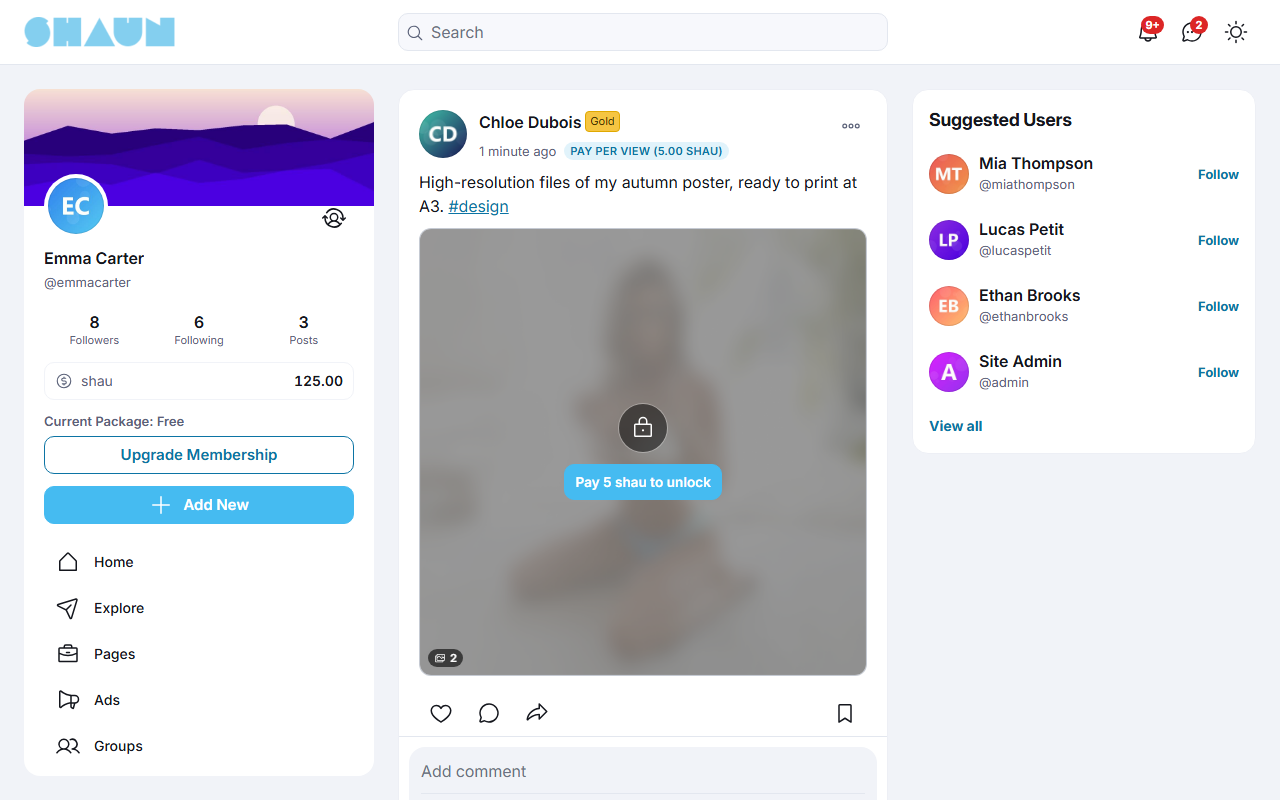
Everyone else sees a blurred preview with a lock and a button to unlock (see Blurred thumbnails). The creator, site admins and moderators always see the content. Members can also send a creator a tip.
| Money | How it works |
|---|---|
| What the buyer pays | the post price or the subscription price, from their eWallet (they enter their password) or, where offered, through PayPal or Stripe |
| What the creator gets | the price minus the platform fee (20% after installing), credited to the creator's eWallet as soon as the payment is made (for PayPal or Stripe, when the gateway confirms it). Creators withdraw it from their eWallet (see the eWallet page) |
| What the site keeps | the platform fee; when a member brought the buyer, part of the fee goes to that member as a referral commission (see Referral commission) |
| Tips | paid from the tipper's eWallet only, and go to the creator in full, with no platform fee |
| Subscription renewals | the price is taken again at the start of every period until the subscriber cancels; there is no refund for the rest of a period |
Subscription renewals, reminders and the end of cancelled subscriptions are handled by the scheduled task (cron job); see What stops when the cron job does not run.
Settings, role permission, subscription and tip packages#
Last updated: 2026-11-17 · v1.5.6
Three things decide who can sell: the settings below, the role permission Allow paid content creation, and the subscription packages. Super admins see both package screens; a moderator role needs Paid content subscription packages and Paid content tips packages (see Moderator roles).
Paid content settings#
The settings save as soon as you change them (see Settings save themselves).
| Setting | After installing | What it does |
|---|---|---|
| Enable | on | off: nobody can post paid content, subscribe or unlock, and every paid post is hidden from feeds and profiles. On again: the paid posts come back. Running subscriptions are not stopped: they keep renewing and subscribers keep paying while the posts are hidden. Before switching it off for good, tell your creators and subscribers, and cancel the running creator subscriptions (see Cancel or resume a subscription) |
| Account verification required before enabling paid content monetization | off | on: a member must have the verified badge before selling. It applies only while user verification is switched on (see Verification) |
| Platform fee (%) | 20 | the share of every post sale and subscription payment the site keeps; 20 means the creator receives 80% |
| Commission for referral (%) | 20 | the share of the platform fee given to the member who brought the buyer (see Referral commission). 0: no commission |
| Users can create paid content | on | off: members cannot become creators, and existing member creators lose paid posting and the Subscribe and Tip options on their profile. Subscriptions already running keep renewing and charging their subscribers |
| Pages can create paid content | on | the same for business pages |
| Auto-renew profile subscriber subscription will be notified to users in advance (days) | 1 | how many days before a renewal the subscriber is reminded |
| Paid content default blurred thumbnail | a standard picture | the preview shown when a post has no blurred preview of its own (see Blurred thumbnails); 1024 × 1024 pixels is recommended |
A new fee or commission applies to every payment from then on, including the renewals of subscriptions that are already running.
Who may sell: the role permission#
In AdminCP → Users → Manage User Roles → Permissions → Paid content, switch on Allow paid content creation for the roles that may sell (see The permissions of a member role). It is off for every role after installing, so nobody can sell until you switch it on. A member without it sees "Your current membership does not have paid content creation permission. Please contact admin to upgrade."; you can sell the permission through a membership package whose role has it (see the Membership page). Site admins and moderators do not need it.
When a creator loses the permission (you switch it off for their role, or their membership ends and their new role lacks it), they can no longer post paid content and their Subscribe and Tip options disappear, but their running subscriptions keep renewing and charging their subscribers.
Subscription packages#
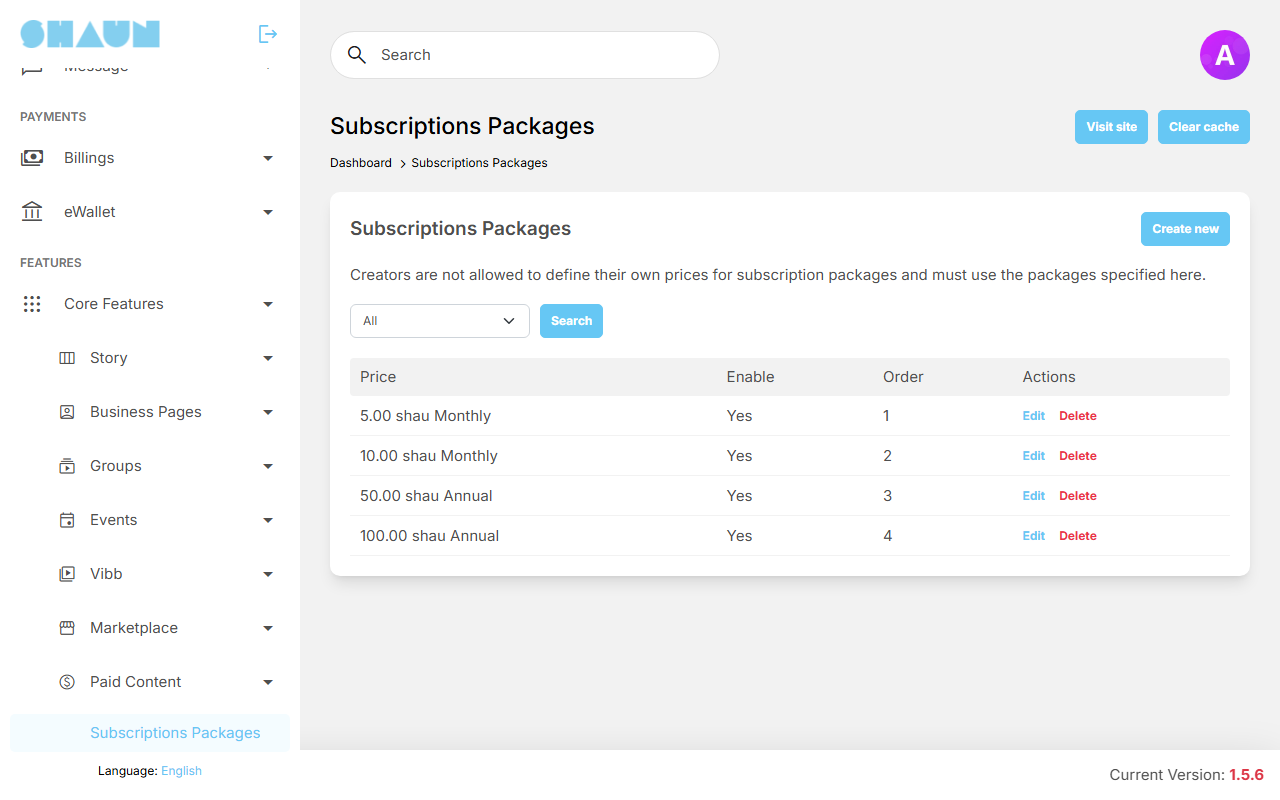
Creators do not type their own subscription price: they pick one of the prices you create here, one per period. Create a few prices for each period you want to offer; until there is at least one active package, nobody can finish the creator settings.
- Click Create new, fill in the fields and click Submit.
What you should see: "Package has been created." and the package in the list.
| Field | What it does |
|---|---|
| Price | the price per period, in your eWallet credits |
| Type | the period: Monthly, Quarterly, Biannual or Annual. It cannot be changed once a creator uses the package |
| Paypal Plan Id, Stripe Product Id | needed only when subscribers may pay by PayPal or Stripe; see Recurring plans on PayPal / Stripe. For a package paid from the eWallet only, leave both empty |
| Support external gateway | off: subscribers are offered only their eWallet; also leave both IDs above empty so the package cannot be paid through PayPal or Stripe. On: PayPal and Stripe are offered too |
| Order | the position of the price in the creator's list (lowest first) |
| Active | off: the price is no longer offered, and creators who use it can no longer be subscribed to at that price |
Filter the list by type and click Search; Edit and Delete are on each row. A change only affects new subscribers: running subscriptions keep their price.
Tip packages#
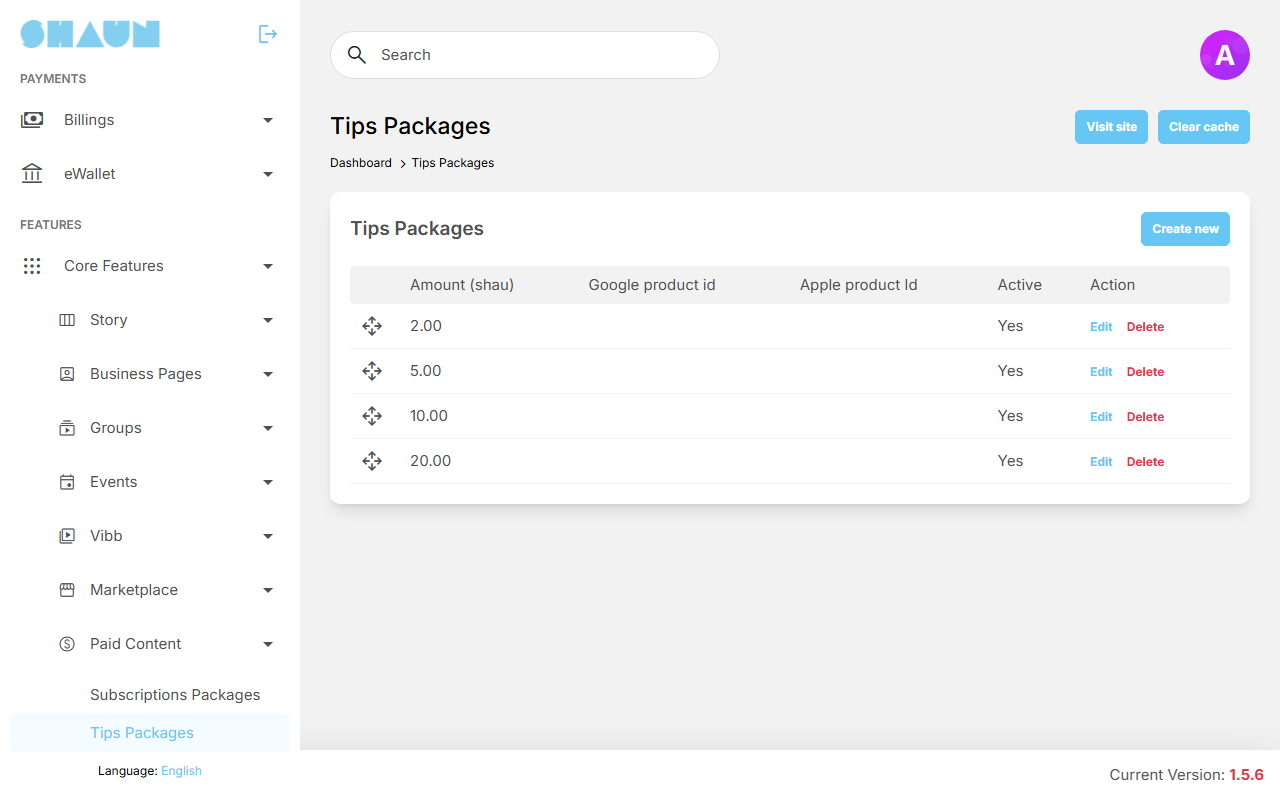
Tip packages are the ready-made amounts shown as buttons in the tip window (members can still type any amount of 1 or more). Click Create new, enter the Amount (at least 1, in your eWallet credits), leave Active on and click Submit. Drag the rows to set their order. Google product id and Apple product Id are only for in-app purchases in the mobile apps.
The subscriber e-mails "When a profile subscription is about to renew" and "When a profile subscription stops" can be reworded in the mail templates (see The templates: payments and subscriptions).
Becoming a creator#
Last updated: 2026-11-17 · v1.5.6
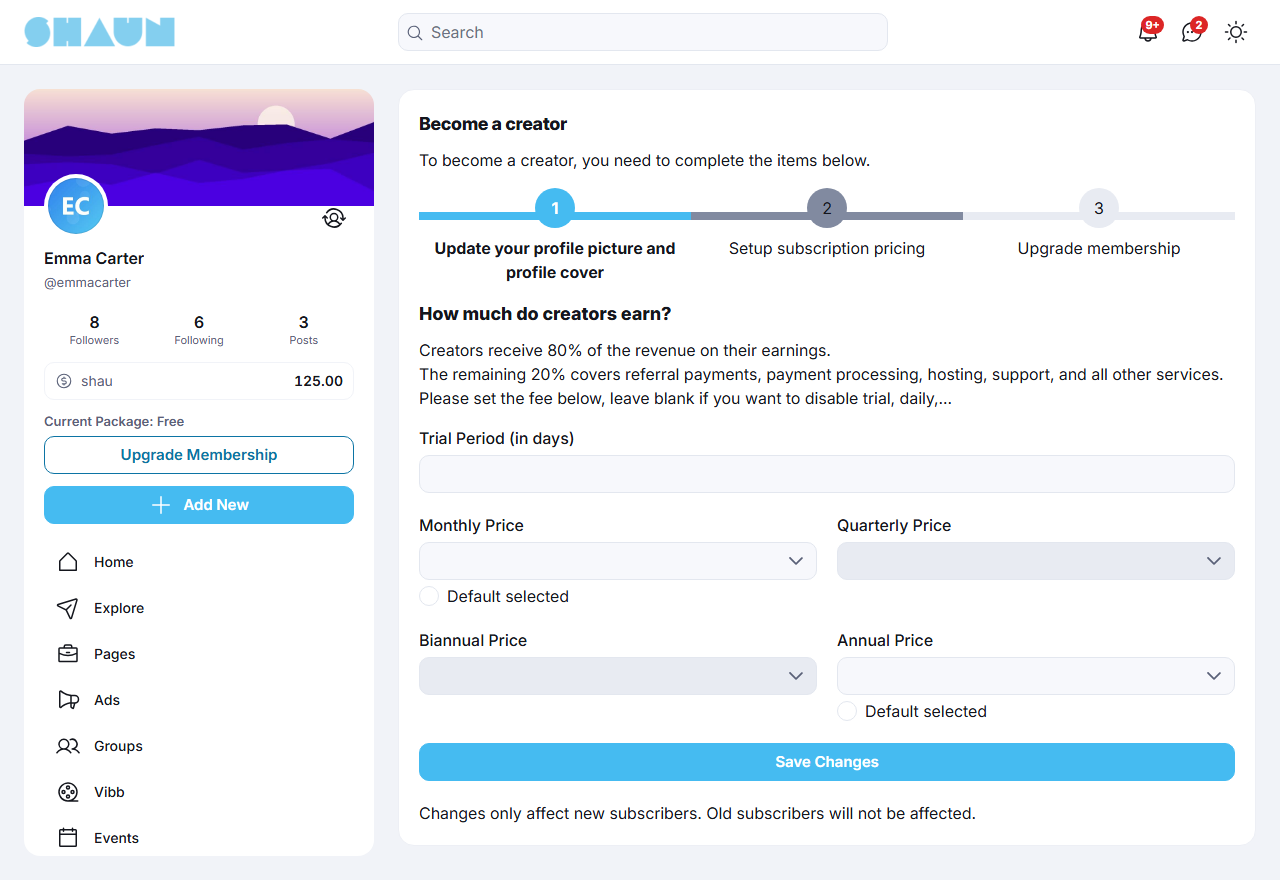
Open Settings → Creator Dashboard. Until you are a creator it lists what is missing; click Start Now. The page Become a creator shows the items as numbered steps; a done step is coloured. Click a step to open it.
- Update your profile picture and profile cover: upload both.
- Setup subscription pricing: for each period (Monthly Price, Quarterly Price,
Biannual Price, Annual Price) pick one of the prices offered, or leave it empty to not offer that
period. Mark one with Default selected to have it preselected for subscribers. Optionally enter a Trial
Period (in days) (up to 730; empty for none). Click Save Changes.
What you should see: "Packages saved successfully." You need at least one price.
- Upgrade membership: needed when your member role does not allow paid content. The step shows the membership packages so you can move to one that does; otherwise ask the site admins. Site admins and moderators skip this step.
- Verify your profile: shown only when your site requires the verified badge for selling.
What you should see: when every step is done, Settings → Creator Dashboard opens your dashboard, the post box offers Paid content, and other members find Subscribe and Tip in the … (Options) menu of your profile.
A business page becomes a creator the same way while you are switched to it; its earnings go to the page's eWallet (see the Business pages page). Changing the prices later in the dashboard's Set Pricing tab affects only new subscribers.
Creating a paid post#
Last updated: 2026-11-17 · v1.5.6
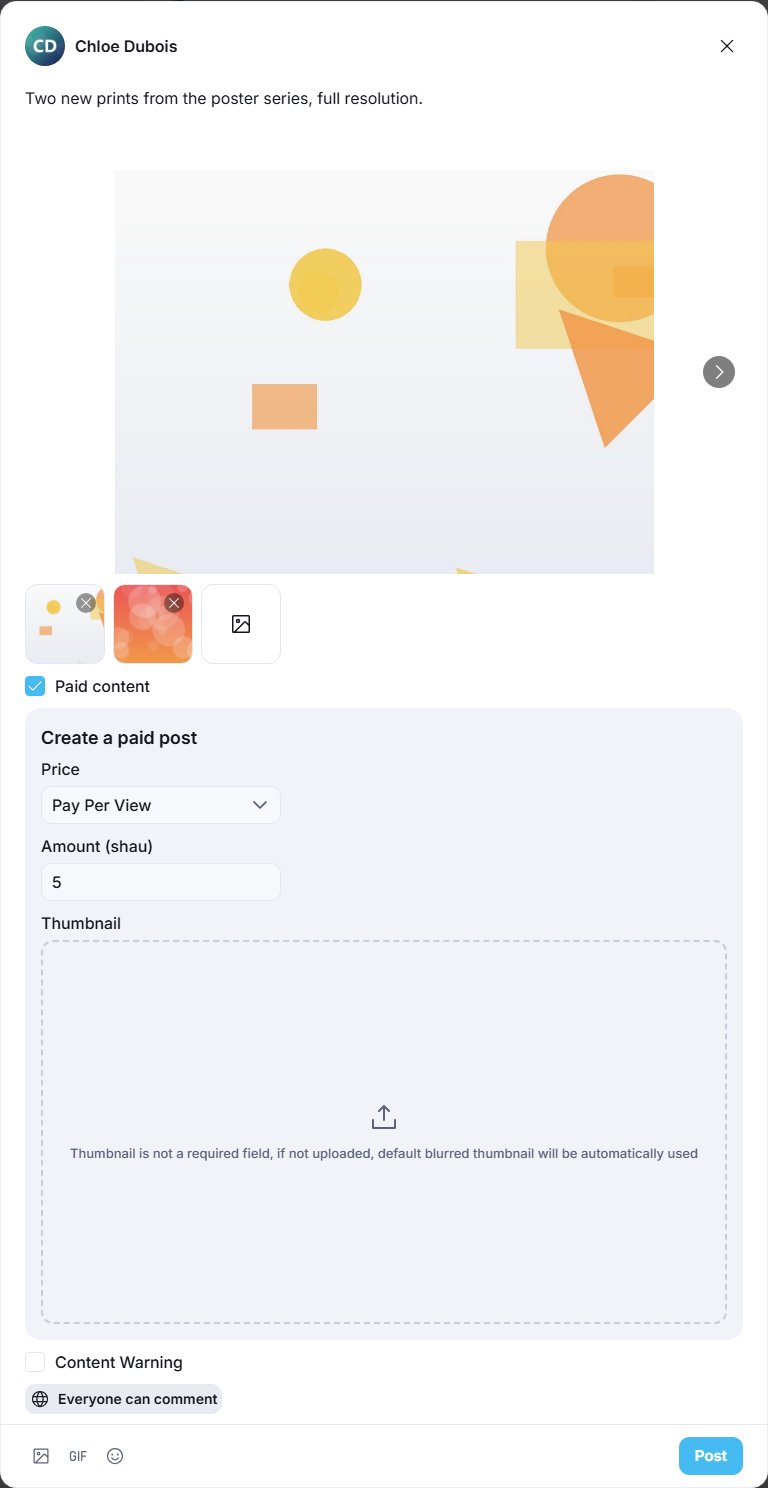
- In the post box on your home feed or profile, write your text and add photos or a video.
What you should see: the Paid content tick box under the media.
- Tick Paid content. Under Create a paid post choose the Price: For Subscribers, or Pay Per View and the Amount (at least 1, in your eWallet credits).
- Optionally upload a Thumbnail: the picture others see before they unlock. Without one, a blurred preview is made for you.
- Click Post.
What you should see: the post with the label For Subscribers or Pay Per View (…) with its price.
- Only photo and video posts can be paid, and only on your own timeline: posts in groups, events and similar places cannot.
- If you are not a creator yet, ticking Paid content shows "Complete your creator settings to start earning." with a link to the steps.
- To change a post later, open its … menu and choose Change Paid Content: switch it between free, For Subscribers and Pay Per View, change the amount or the thumbnail.
- Your paid posts are collected in the Paid Media tab of your profile.
Blurred thumbnails#
Last updated: 2026-11-17 · v1.5.6
What a member sees on a paid post they have not unlocked comes from three places, in this order:
- the Thumbnail the creator uploaded with the post;
- otherwise, a blurred copy of the post's first photo, or of the video's preview picture, made by your server when the post is saved, when your server can make one (see the box below);
- otherwise, the picture in AdminCP → Site Settings → General Configuration → Paid content → Paid content default blurred thumbnail. Upload your own there to match your site.
The blurred copy is made only when the PHP Imagick extension is installed; see Imagick: iPhone photos and blurred previews.
Over the preview, a lock and the button Subscribe to unlock or Pay [amount] [token name] to unlock are shown, with the number of photos or the video length in the corner. The token name is the name your site gives its eWallet token, set in AdminCP → Site Settings → General Configuration → eWallet → Token name (see Name the token and set the exchange rate). On a site whose token is named "shau", a post priced at 5 shows Pay 5 shau to unlock.
Creator dashboard#
Last updated: 2026-11-17 · v1.5.6
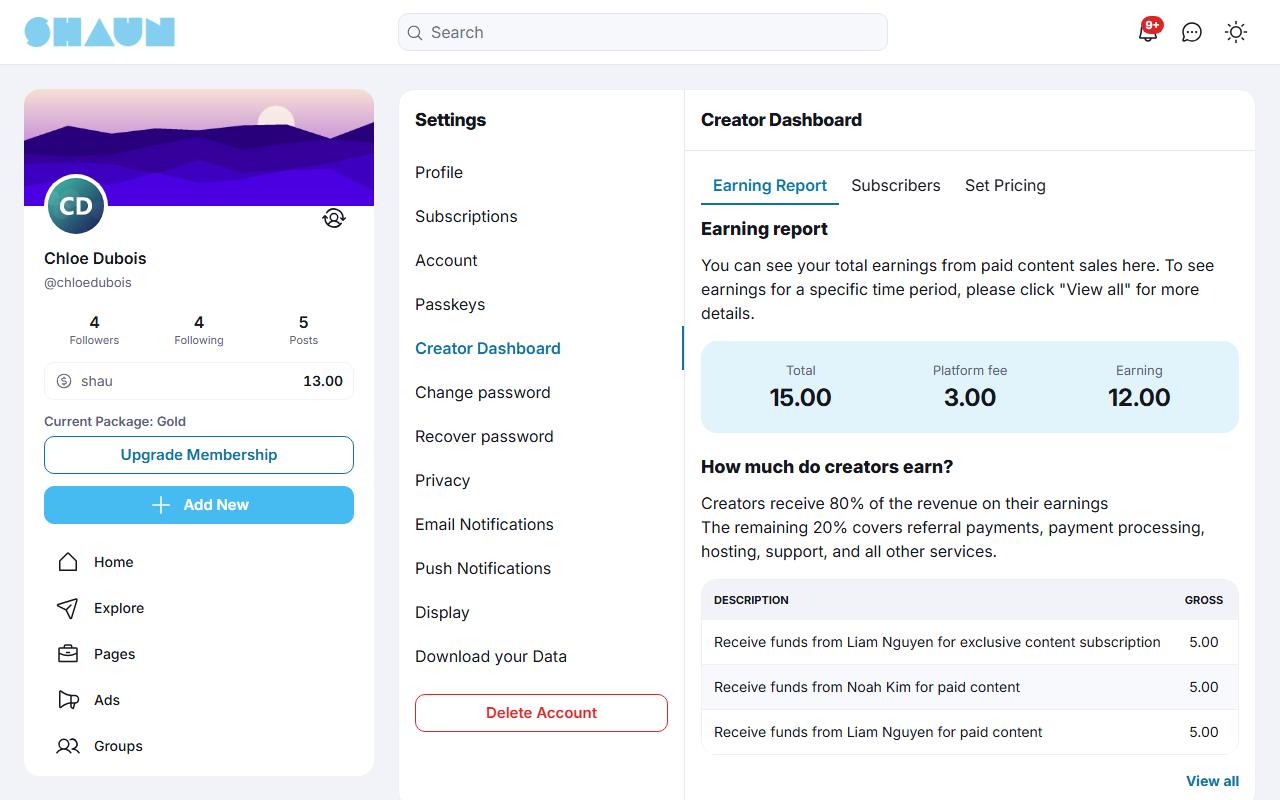
Settings → Creator Dashboard has three tabs.
| Tab | What it shows |
|---|---|
| Earning Report | Total (everything buyers paid you), Platform fee (what the site kept) and Earning (what you received), with the list of sales: Description, Gross, Platform fee, Net and Date. View all opens the transactions in your eWallet, where you can see a period and withdraw. Tips are in your eWallet, not in this report |
| Subscribers | the members subscribed to you with Status, Package and Date. Search by Keyword, Status (Active, Cancel, Stop) and Type (Past 30, 60 or 90 days, or Custom with From Date and End Date) |
| Set Pricing | the prices and trial of your subscriptions, as in the creator steps; changes affect only new subscribers |
On a subscriber's row, View opens the subscription with its Payment history. You can also Cancel a subscriber's subscription (it ends at the end of the period already paid, without refund) or Resume a cancelled one before it ends. A subscription you cancelled cannot be resumed by the subscriber, only by you.
Unlocking and subscribing#
Last updated: 2026-11-17 · v1.5.6
You need to be signed in. Paying from the eWallet always ends with your password; when PayPal or Stripe is offered and you choose it, you complete the payment on that site instead.
Unlock a pay-per-view post#
- Click Pay [amount] [token name] to unlock on the post (for example Pay 5 shau to unlock; see
Blurred thumbnails for the token name).
What you should see: the window Your order with the price, the payment methods and your eWallet balance.
- Choose a payment method, tick the terms when your site shows them, click Pay Now, and for the eWallet enter
your password.
What you should see: "Post has been unlocked" and the photos or video. The creator gets the notification "unlocked your paid post.".
You pay once per post and keep it: Lists → Unblocked Posts collects the posts you unlocked. With too little balance you see "You don't have enough balance".
Subscribe to a creator#
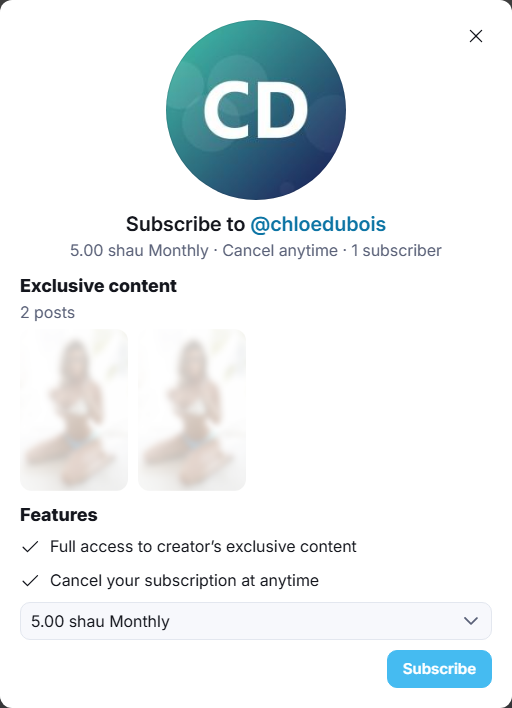
- On the creator's profile, open the … (Options) menu and choose Subscribe, or click Subscribe to
unlock on one of their posts.
What you should see: the window Subscribe to @… with the number of paid posts, a few previews, the features and the list of prices with your site's token name (for example "10 shau Monthly", or "7 day(s) trial then 10 shau Monthly" on a site whose token is named "shau").
- Pick a price and click Subscribe, then choose the payment method in Your order, click
Subscribe now and, for the eWallet, enter your password.
What you should see: "Subscription successful". The creator's subscriber posts open for you, and the profile's … menu now offers Subscribed. The creator gets "subscribed to your profile.".
- Trial: when the creator offers one, you get it once per creator, and only when paying from the eWallet: nothing is taken now, and the price is taken from your eWallet when the trial ends.
- Renewal: the price is taken again every period. A day before (after installing) you get a notification and the e-mail "Your subscription to [creator] … renews soon". If your balance is too low, or a PayPal or Stripe payment does not arrive in time, the subscription stops and the posts lock again.
Send a tip#
- On the creator's profile, open the … (Options) menu and choose Tip.
- Click one of the amounts, or type your own under Enter amount (at least 1), and click Send Tip.
- Enter your password.
What you should see: "Tip successful". The creator gets "you received a tip from [you].".
Tips are paid from your eWallet only, and the whole amount goes to the creator.
Cancelling a subscription#
Last updated: 2026-11-17 · v1.5.6
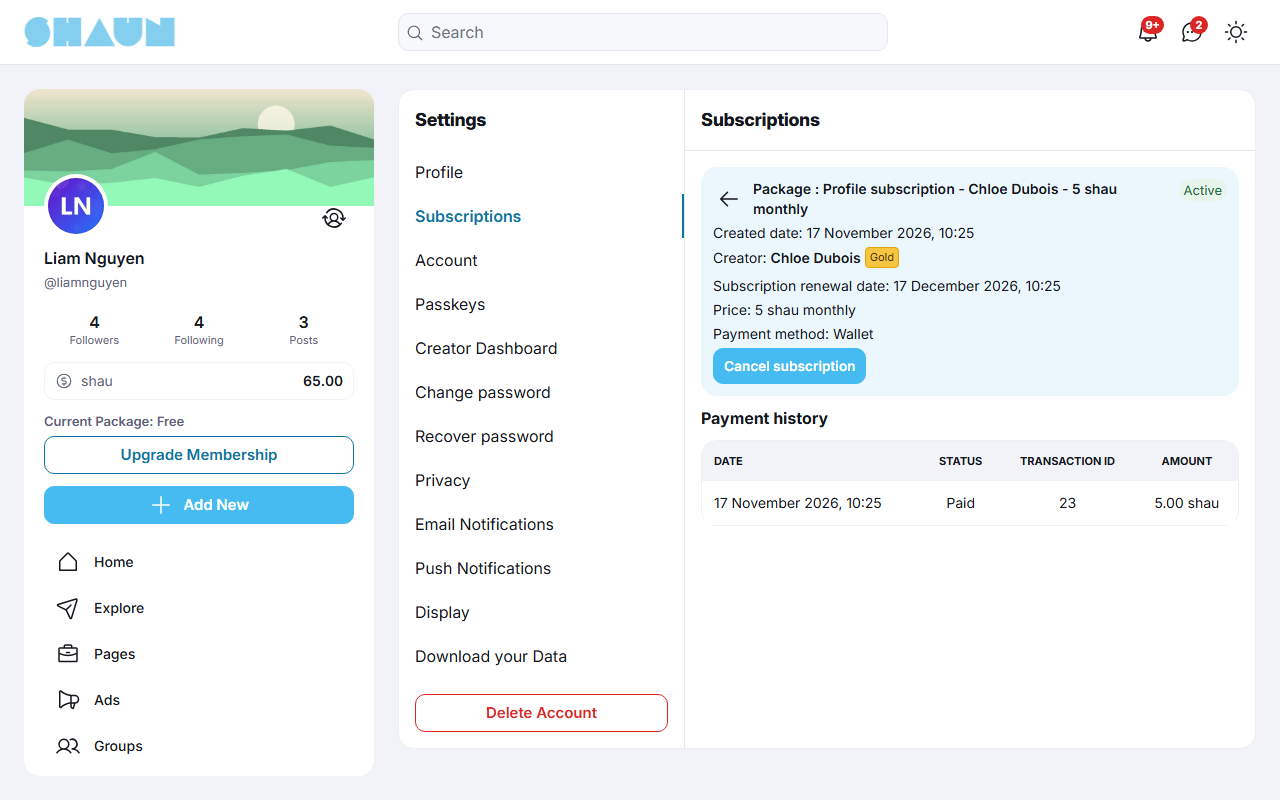
- Choose Subscribed in the … (Options) menu of the creator's profile, or open Settings → Subscriptions and the subscription (Profile subscription - [creator]).
- Click Cancel subscription and confirm with Cancel Subscription.
What you should see: the status Cancelled and "Subscription will stop at" with the date. Nothing more is charged; the posts stay open until that date and the rest of the period is not refunded.
Before that date, Resume subscription brings it back as before. If the creator cancelled your subscription, you cannot resume it yourself; only the creator can. When it stops, you get the notification "your subscription to [creator] has stopped" and an e-mail, and the creator's subscriber posts lock again. You can subscribe again later; the trial is not offered a second time.
Referral commission#
Last updated: 2026-11-17 · v1.5.6
Members earn a commission when people they bring unlock a paid post (paid in any way) or subscribe to a creator from their eWallet. The commission is a share of the platform fee, so it costs the creator nothing.
- How it is counted: with the settings after installing (platform fee 20%, commission 20%), a post sold for 100 credits gives the creator 80, the referring member 4 (20% of the 20 fee) and the site 16.
- Who earns: the member whose link or shared post the buyer came through: someone who shared the post to their profile, or whose copied post link the buyer opened. Every post link a signed-in member copies carries their referral code. The buyer and the creator never earn on their own purchase.
- Subscriptions pay the commission only on the first eWallet payment (after the trial, if there is one), not on renewals. Creator subscriptions paid through PayPal or Stripe earn no commission.
- Share to Earn: on someone else's paid post, the post's … menu offers Share to Earn, which opens the sharing choices (Copy link, Share to your profile, Mail, Share to social networks, Send Message). It is shown while the commission setting is above 0.
Commissions are paid into the member's eWallet and appear in their referral dashboard (see Your referrals and the referral dashboard). Admins set the share in Paid content settings; 0 switches it off.
Creator notifications#
Last updated: 2026-11-17 · v1.5.6
Creators are told about their sales. In Settings → Notifications, the group Related to paid content has two switches, both on for a new account (see Notifications):
| Setting | You are told |
|---|---|
| New subscriber | "[member] subscribed to your profile." when someone subscribes |
| New pay per view purchase | "[member] unlocked your paid post." when someone unlocks a post |
Untick a switch and click Save to stop that notification; the money still arrives. Tip notifications ("you received a tip from …") do not depend on these two switches.
Change log#
Last updated: 2026-11-17 · v1.5.6
| Date (GMT+7) | Section | What changed |
|---|---|---|
| 2026-11-17 | all | First version for 1.5.6, written from the 1.5.6 code as a guide for members and site admins. |
| 2026-11-17 | admin, become-creator, blurred-thumbnails, creator-dashboard, unlock-subscribe, unsubscribe, referral | Corrections after review: Subscribe, Subscribed and Tip are in the profile's Options menu, eWallet-only packages need empty PayPal and Stripe IDs, what switching paid content off or losing the permission does to running subscriptions, fee changes apply to renewals, a subscription cancelled by the creator, which subscription payments earn a referral commission, the Imagick note for the server administrator. |
| 2026-11-17 | blurred-thumbnails, unlock-subscribe | The unlock button and the subscription prices show your site's token name (for example "Pay 5 shau to unlock"), not the word "Credits"; where the token name is set. |