
The Plugin Manager makes it easy to extend your ShaunSocial community by installing and managing plugins directly from the Admin Control Panel. You no longer need to manually upload plugin files via FTP or access your server to install new features.
With Plugin Manager, you can quickly upload, install, enable, disable, and uninstall compatible ShaunSocial plugins from one centralized location.
Whether you’re adding a new Marketplace, Events, AI, or other premium plugin, the Plugin Manager simplifies the entire process and helps keep your community organized.
Features #
The Plugin Manager allows administrators to:
Manage all installed plugins from a single location
Install plugins directly from a plugin package (.zip)
Enable or disable installed plugins
Uninstall plugins that are no longer needed
To access the plugins manager, please go to admincp -> Plugins -> manage
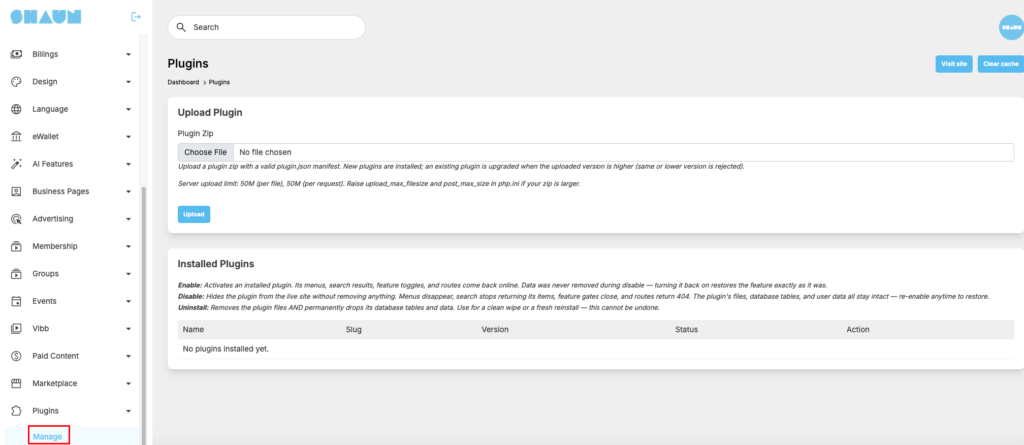
Choose the plugin package that you purchased from shaunsocial.com and click on “Upload”, plugin will auto install
After the plugin is installed, you can see it in the list that allow you to disable or uninstall
List of installed plugin will auto insert as sub-menu of the “Plugins” menu in admincp.
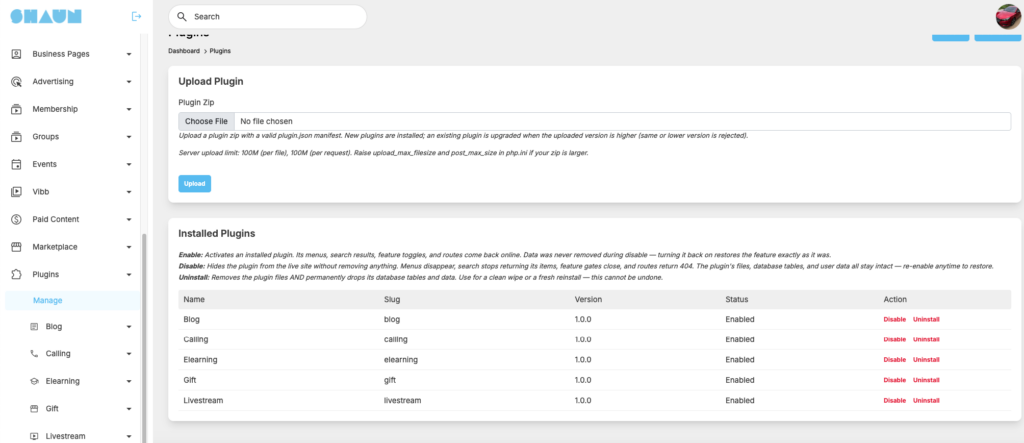
Clear global cache after plugin is installed and then start configure and check around to see if it’s work well or not.


