
Managing a demo site often means giving clients or potential customers access to a real ShaunSocial installation so they can explore its features. However, testing users may accidentally delete demo accounts or change important account credentials such as the email address or password.
ShaunSocial now provides Account Locking in the AdminCP, giving administrators better control over accounts that need to be protected. You can access this setting in admincp (see below screenshot)
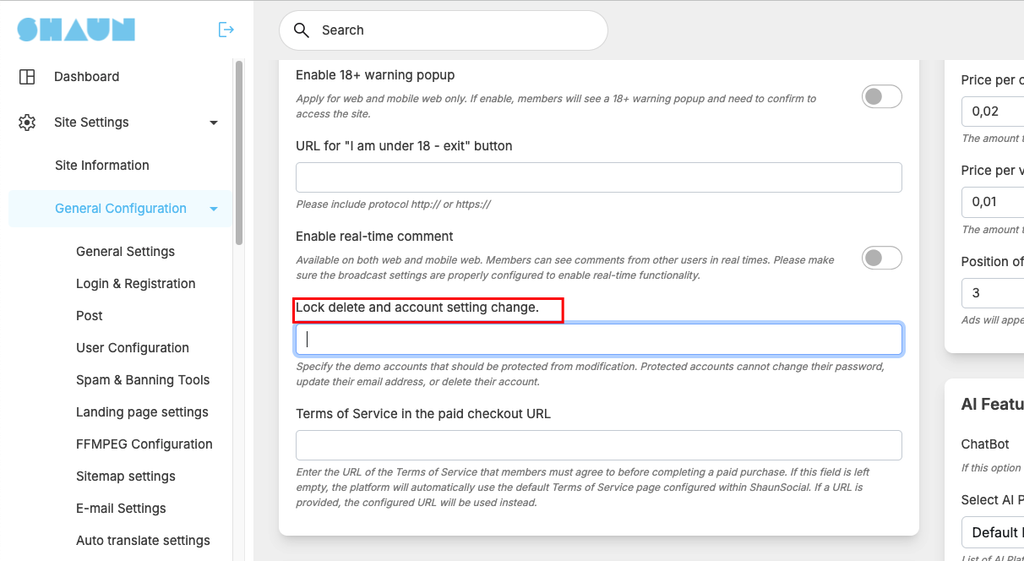
🔒 Protect Important Accounts #
Administrators can add one or multiple members to the Account Lock List and choose which account actions should be restricted.
Protected accounts can be locked against:
- Account deletion – Prevent the account from being deleted.
- Password changes – Prevent the password from being changed.
- Email changes – Prevent the email address from being changed.
This is especially useful for demo accounts, administrator-created test accounts, support accounts, or any account that needs to remain available and unchanged.
👥 Protect Multiple Accounts #
There is no need to configure accounts one by one. Administrators can manage multiple protected members directly from the AdminCP and add or remove accounts from the lock list whenever needed.
🎯 Perfect for Demo Sites #
If you provide a ShaunSocial demo to customers, you can create dedicated demo accounts and protect them from accidental changes. Visitors can freely test the platform while you maintain control over the account credentials and availability.
With Account Locking, administrators have an additional layer of protection to keep important accounts safe, consistent, and ready for testing at all times.


