
Table of Contents
The Edit Profile feature allows users to update their personal information, profile photo, and other details displayed on their profile page.
How to Edit Your Profile #
- Click Settings from the left sidebar menu.
- Select Profile from the settings menu.
- Update the desired profile fields.
- Click Save to apply the changes.
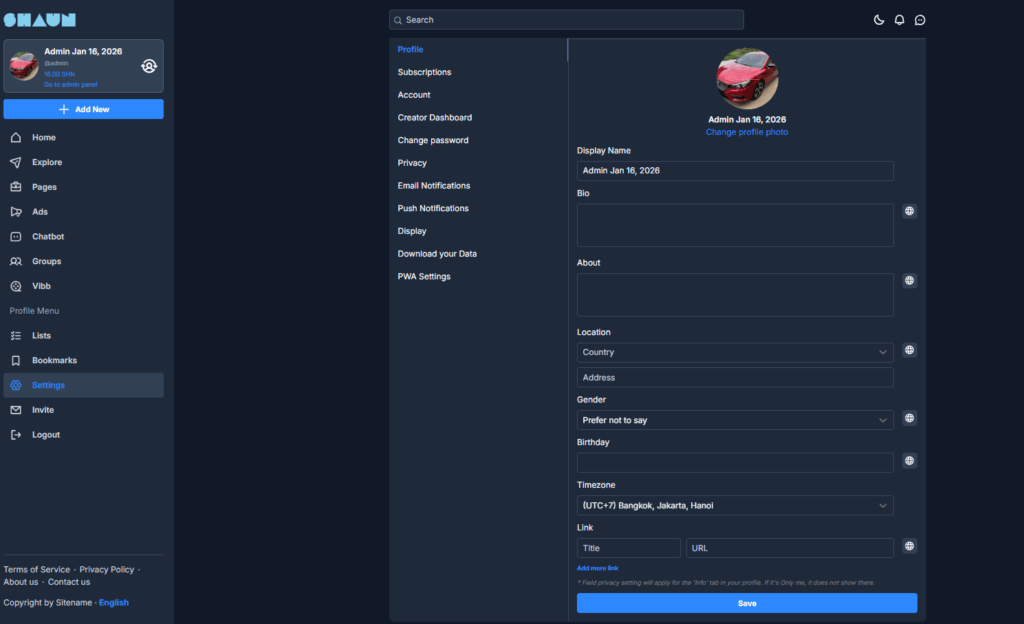
How to Edit Your Profile #
- Click Settings from the left sidebar menu.
- Select Profile from the settings menu.
- Update the desired profile fields.
- Click Save to apply the changes.
Profile Information Fields #
Display Name #
The name displayed on your profile and across the platform.
Profile Photo #
Click Change profile photo to upload a new profile picture.
Bio #
A short introduction about yourself that appears on your profile.
About #
Additional information you want to share with other users.
Personal Information #
Location #
- Country
- Address
Gender #
Select your preferred gender option.
Birthday #
Enter your birth date.
Timezone #
Choose your local timezone for accurate time display across the platform.
Links #
You can add personal or professional links to your profile.
Fields include:
- Title – Name of the link
- URL – Website address
Click Add more link to include multiple links.


